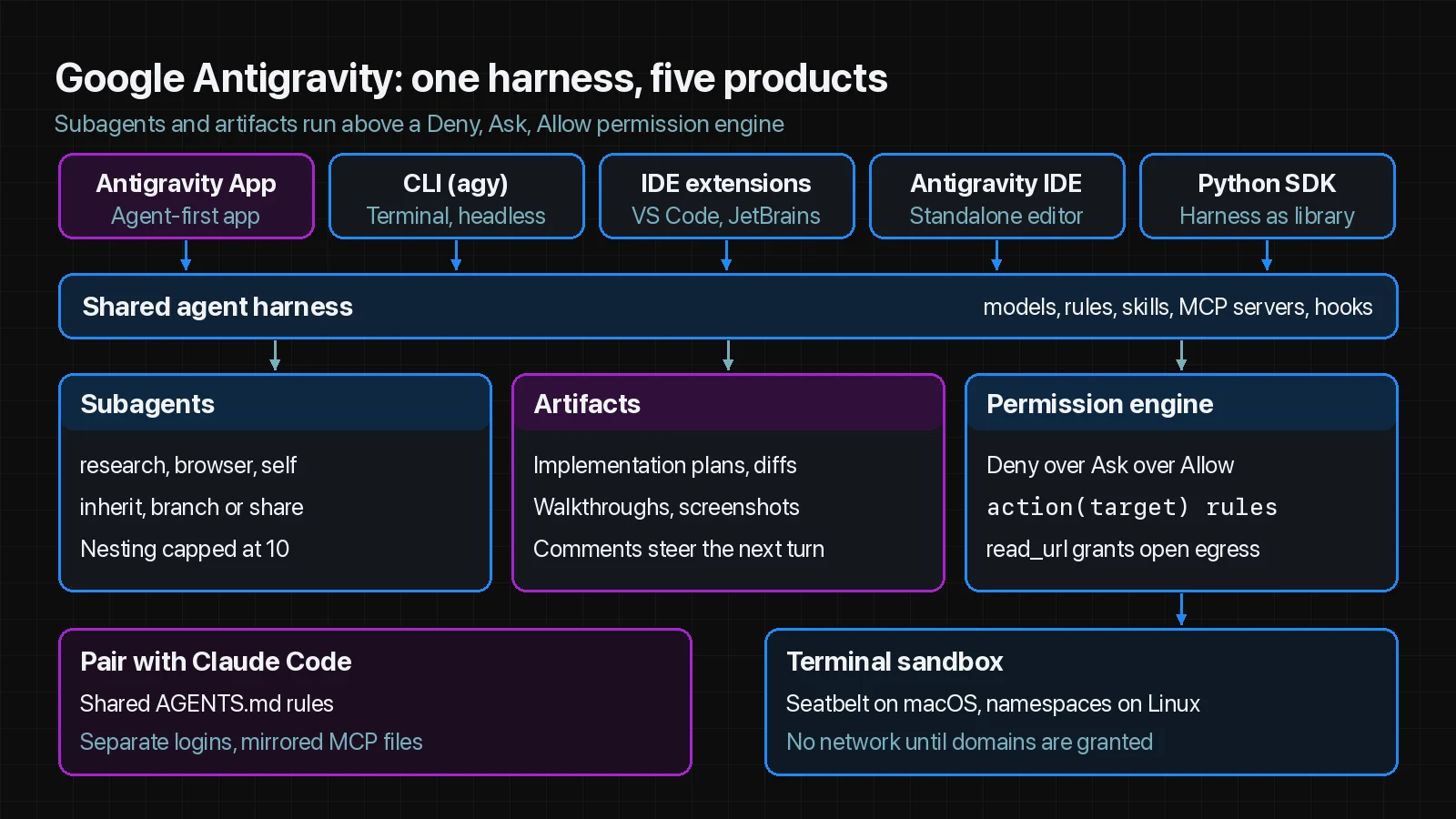
Google Antigravity is Google's agent-first development platform, and in November 2026 it is no longer a single application. The download page lists five products: the Antigravity App, the Antigravity CLI (agy), editor extensions for VS Code, Visual Studio, JetBrains IDEs, Zed, Xcode and Eclipse, the standalone Antigravity IDE, and a Python SDK. Google's overview says every surface runs on a shared agent harness, so the architectural questions are which surface each team works in, what that harness may touch, and how its quota is counted.
This teardown covers the Agent Manager lineage, the editor and agent views, subagents, artifacts and verification, the permission engine, MCP and extension support, and model quota by plan, then closes with when to pair Antigravity with the Claude Code CLI. It does not repeat the three-way editor decision, which our AI IDE architectural comparison of VS Code, Cursor and Google Antigravity owns, or CLI seat economics, covered in Claude Code vs Codex vs Cursor: Enterprise Architecture and Cost. Every product fact below was read from the linked vendor page on November 24, 2026. The Antigravity changelog shows frequent releases (App v2.35.0 shipped November 23, 2026), so treat versions as dated inputs.
What is Google Antigravity, architecturally?
Google introduced Antigravity on November 18, 2025 as an IDE with two surfaces. The Editor view was a familiar AI IDE with Tab completions, inline commands and an agent in the side panel. The Agent Manager inverted that relationship: Google described it as mission control for spawning, orchestrating and observing multiple agents across multiple workspaces in parallel, and chose to keep it in a separate window from the editor, optimizing for fast handoffs between the two instead of one crowded window.
Antigravity 2.0, announced May 19, 2026, moved the Agent Manager idea into a standalone desktop application with no IDE. It regrouped conversations from workspaces (repositories) into projects that can span several folders with their own settings and permissions, and added dynamic subagents, JSON hooks and scheduled tasks. Google said it planned to remove the Agent Manager from the Antigravity IDE in a later release and recommended dual-wielding the new app with an IDE of your choice. Editor extensions followed on August 20, 2026. The current product line:
- Antigravity App (v2.35.0): the agent-first command center. Agents work in projects with Local or New worktree mode, a side panel holds artifacts, files, diffs, terminals and web pages, and an Overview panel lists the changes, artifacts and subagents each conversation produced (features).
- Antigravity CLI (
agyv1.5.13 on the download page): a terminal client with execution modes, a headless-pflag for scripting and CI, and a keyboard-driven artifact review panel. - Editor extensions (VS Code v1.13.0 plus Visual Studio, JetBrains, Zed, Xcode and Eclipse): an Agent side panel with inline diffs. The VS Code guide says the extension installs the local
agybackend service on first launch and runs it as a background server (agy --hub). - Antigravity IDE (standalone, v2.8.0, November 19, 2026): since v2.6.0 its agent interface has been powered by a built-in Antigravity extension, per the changelog. It does not support Gemini Enterprise sign-in.
- Antigravity SDK (Python, v0.1.24): the harness as a library, with declarative
allowanddenytool policies (getting started).
Editor view versus agent view today
The two views still exist, but as different products, and they expose different controls. In the App the conversation is the primary object. Its Review pane compares Uncommitted, Branch and Agent Edits views and can stage, commit, amend and push, and personal accounts on v2.30.0 or later can switch between a Software Engineering layout (worktrees, change review, terminals, subagent cards) and a Knowledge Work layout. Both layouts share the same agent, models, permissions, skills, MCP servers and plugins.
In the IDE and the extensions the editor is primary. The Agent side panel shows each turn's steps, a files-with-changes bar with Accept all and Reject all, and edits highlighted inline. In planning mode in the IDE, task groups split a large task into subtasks and collect pending approvals, such as terminal commands, in one section at the end. Google's August 2026 post frames the split plainly: it built lightweight editor integrations rather than turning traditional editors into heavy multi-agent hubs. The practical reading is that the App is where you supervise many agents and the editor is where you inspect code paths, and some capabilities, such as the built-in browser, exist only in the App.
How do artifacts and verification work in Antigravity?
The artifacts page defines an artifact as a structured deliverable the agent creates to accomplish its task and communicate its progress: Markdown implementation plans, code diffs, architecture diagrams, images and browser recordings. The 2025 launch post also named task lists, walkthroughs and screenshots, and presented artifacts as an answer to a trust problem: showing every tool call overwhelms a reviewer, while showing only the final diff gives no way to verify how the agent got there.
In the App, IDE and extensions the loop has four checkpoints:
- Mode choice. A conversation starts in Planning mode or Fast mode. Planning mode researches the codebase, organizes work in task groups and produces plans; Fast mode skips the planning phase for small, local edits such as a rename.
- Plan gate. The agent requests review of the implementation plan before changing code, whatever the review policy. Reviewers highlight passages and comment; comments ride along with the next message as a chip, and Proceed continues with them attached.
- Review policy. Plan Review Policy in Settings is Always Ask (recommended) or Always Proceed. Always Proceed does not skip a plan you request with
/plan; the agent still stops for approval. - Completion evidence. A walkthrough summarizes the changes and validation results. When you plan with
/plan, the agent is asked to embed screenshots, and recordings when available, to show UI changes.
The CLI expresses the same contract as a keyboard workflow. Ctrl+R opens an artifact picker where each new plan or file can be approved with y, rejected with n or bulk-approved with Shift+A, and a detail viewer lets you press c to attach a comment to a specific line before the agent writes to disk. Media files sit in a separate drawer and open in your operating system viewer.
What artifacts do not prove
Artifacts are evidence produced by the same agent that did the work, so treat them as a review surface rather than an independent check. The documentation is explicit about two gaps. A screenshot is not an artifact on its own: to comment on one, you ask the agent to save it to the conversation's artifacts. And in the IDE a browser recording may not be produced at all; sessions that only open pages or take screenshots produce none, and an interactive session might not produce one either.
Keep CI tests, branch protection and human code review as the gate of record, and use plans and walkthroughs to decide where a reviewer should look first. That division matches the layered model in our three-lane agent governance architecture: prompts and artifacts steer, while hard controls contain.
How do Antigravity subagents, browser agents and terminals spawn?
Delegation runs through one tool. Per the subagents guide, the parent calls invoke_subagent, the child starts with a clean context window rather than the parent's history, and it gets one of three workspace modes: inherit the parent's workspace, branch into an isolated Git worktree, or share directory storage. The built-in subagents are research, browser and self, a clone of the caller. Custom subagents live in .agents/agents/ or ~/.gemini/config/agents/ as Markdown with YAML frontmatter that sets tools, a model tier (inherit, flash or pro) and a commandExecutionPolicy that defaults to sandbox. The governance properties that matter:
- Nesting is capped at 10 levels of subagents beneath the primary agent.
- Subagents inherit the parent's allowed command prefixes, file read and write scopes and sandbox settings, and any approval request bubbles up to the main UI or subagent panel.
- A killed subagent has its temporary worktrees cleaned up, and its transcript stays readable as a JSONL log.
- Three orchestrators sit above single subagents:
/boostfor problems that are hard rather than broad,/swarmfor broad work split across named workers and a verifier, and/teamworkfor long multi-milestone projects./swarmruns on all plans;/boostand/teamworkneed a paid plan. - The docs list a known issue: a misspelled tool name in a custom subagent's
toolslist may hang the subagent, so validate agent files before they ship.
The browser subagent has two backends
Browser verification is where the surface choice changes the architecture. According to the browser use guide, the Antigravity App on personal Google Accounts (v2.30.0 and later) runs the browser subagent inside a built-in side-panel browser with its own persistent cookie profile per Antigravity account, parallel subagents in isolated tabs, an animated cursor and a Stop button for takeover. Everywhere else, meaning the CLI, business and enterprise accounts in the App, and the Antigravity IDE, /browser drives your local Google Chrome 144 or later through the Chrome DevTools MCP server once you enable remote debugging at chrome://inspect/#remote-debugging.
The Chrome backend has a property security teams should notice: it does not create a separate Chrome profile. It attaches to the Chrome you already run and shares its cookies and sign-ins. It supports one live Chrome connection at a time, and in the IDE it works only in local workspaces, not Remote-SSH, Dev Containers or cloud workstations. In the App, browser subagents run on a Gemini Flash model by default to conserve higher-tier quota, and if Flash quota runs out the agent stops and asks instead of switching models.
What do the Antigravity terminal sandbox and permission presets enforce?
Antigravity's permission engine represents each sensitive operation as action(target), using the actions read_file, write_file, read_url, execute_url, download_url, command and mcp. Rules sit in Deny, Ask and Allow lists evaluated strictly as Deny over Ask over Allow, and a preset sets the baseline underneath them. The App presets for personal accounts are:
| Preset | Terminal sandbox | Terminal commands | File access | MCP and web |
|---|---|---|---|---|
| Request Review | Off | Always ask | Workspace only | Ask |
| Default (selected by default) | On | Allowed in sandbox; ask outside it | Workspace and temp directories | Ask |
| Auto | On | Allowed in sandbox; checked automatically outside it | Workspace and temp directories | Ask |
| Turbo | Off | Allowed without restriction | Full filesystem | Allowed |
The terminal sandbox uses native operating system primitives rather than virtual machines: Seatbelt profiles through sandbox-exec on macOS and kernel namespaces on Linux, and the CLI adds a Windows AppContainer that requires Windows 11 24H2 with the August 2026 update. Sandboxed commands can write to project folders, temp directories and common build caches, are blocked from sensitive files such as ~/.ssh and .env, and have no network until domains are approved.
The coupling to permissions is the part to design around. Paths granted under read_file and write_file become read-only and read-write sandbox mounts, and every domain granted under read_url is compiled into the sandbox's outbound network allowlist. By that rule, a broad read_url(*) grant made for web research also opens the network to curl and npm inside the sandbox, so review URL grants as if they were firewall rules.
Prefix matching is hardened against hidden execution. When a command contains command or process substitution, brace expansion, network redirections or developer-tool flags that run subcommands, Antigravity disables prefix matching for the whole line and requires a character-for-character match. With command(git) allowed, git status && git log runs without a prompt, while git log $(whoami) asks.
Browser allowlists and defaults that differ by surface
- Browser Actuation Rules hold separate
execute_urlanddownload_urllists (allowlist and denylist). A rule matches a domain and its subdomains, Deny beats Allow even under Turbo,localhostis isolated per port, and sensitive Google hosts such as Gmail, Docs, Drive and the Cloud console need their own explicit rule. - Some gates survive every preset. File uploads always ask and accept only files staged for the task (up to 20 files, 50 MiB each and 100 MiB in total), executable and active-markup downloads are blocked, and identity-provider and payment pages are blocked from actuation and masked out of screenshots.
- The CLI sandbox is off by default (
enableTerminalSandboxisfalse) unlessautomode is active. Since CLI v1.5.7,autois the starting mode where it is available, which excludes business and enterprise accounts. - In the standalone IDE, terminal sandboxing is disabled by default. Strict mode forces Request Review for terminal commands, browser JavaScript and artifacts, respects
.gitignore, blocks files outside the workspace, and turns the sandbox on with network access denied. - Turbo gives the agent read and write access to the full filesystem. The enterprise guide recommends unrestricted auto-approval only in isolated development containers or disposable branches; treat that as policy, not advice.
How do MCP, rules, skills and extensions plug into Antigravity?
Antigravity uses its own file layout, which matters as soon as another agent shares the repository. MCP servers are declared in mcp_config.json, globally at ~/.gemini/config/mcp_config.json or per workspace at .agents/mcp_config.json, with command for a local stdio server or serverUrl for a remote one. Remote servers must use Streamable HTTP; the legacy HTTP plus SSE transport is not supported. Tools are lazy-loaded by default: Antigravity caches each tool schema to disk, lists only tool names in the system prompt, and has the agent read a schema file before calling call_mcp_tool. Marking a tool eager puts its full schema into every turn. Unconfigured MCP calls default to Ask, and mcp(server/tool) rules scope approvals per tool. For the token side of that trade-off, see our MCP vs CLI decision record.
Rules load from AGENTS.md, GEMINI.md and .agents/rules/ in the workspace folder and each parent up to the repository root, plus global files under ~/.gemini/, and AGENTS.md is always on. Antigravity does not load rules from subfolders below the workspace folder, even when the agent edits files there. Skills follow the open SKILL.md standard: the agent sees each skill's name and description every turn and reads the full instructions only when one looks relevant. Plugins bundle skills, agents, rules, MCP servers and hooks, and agy plugin import claude migrates plugins from ~/.claude/plugins/.
The VS Code and Open VSX relationship
Three separate relationships get conflated in tool evaluations:
- Antigravity inside VS Code. Google publishes the
Google.google-antigravityextension on the Visual Studio Marketplace for VS Code 1.90 or later, and the same extension ID is listed on Open VSX under a verified Google namespace, at v1.13.0 on both registries when we checked. The extension is a client: it installs and talks to a localagybackend. - Extensions inside the standalone Antigravity IDE. Google's documentation does not say which extension registry the IDE uses. The changelog shows IDE v2.0.3 migrating settings, extensions and keybindings from Antigravity 1.0, so test the extensions your team depends on, especially Microsoft-only ones, before standardizing on it.
- Cursor and Claude Code on the same registries. Cursor installs from Open VSX through its own scanning proxy and ships Anysphere builds for some Microsoft-only extensions (Cursor extensions). Anthropic publishes the Claude Code extension to both the Visual Studio Marketplace and Open VSX and documents installing it in other VS Code forks; where an editor cannot install it, run the
claudeCLI in the integrated terminal (Claude Code for VS Code).
How are Antigravity models and quota accounted for by plan?
Antigravity meters work through plan quota rather than visible per-token bills. The plans page says rate limits correlate with the amount of work the agent does, so straightforward tasks yield more prompts than complex ones, and bring-your-own-key is not supported. Model availability comes from the models page and the pricing page:
| Plan | Quota or billing basis | Models (November 24, 2026) | Overage path |
|---|---|---|---|
| Free and Google AI Plus | Baseline quota refreshed weekly, with a weekly rate limit | Gemini 4 Hydrogen; Gemini 3.8 Flash, Claude Sonnet 4.6, Claude Opus 4.6 and GPT-OSS-120b until November 30, 2026 | AI credits apply to Pro and Ultra only |
| Google AI Pro (paid) | Quota refreshed every five hours until a weekly limit is reached | Gemini 4 Neon, Carbon, Argon and Hydrogen, Orchestrator, and Claude Sonnet 5.5 and Opus 5.5 (thinking) on non-trial plans; Argon and the other legacy models leave November 30, 2026 | AI credits at Gemini Enterprise consumption pricing, controlled by the AI Credit Overages setting (Never or Always) |
| Google AI Ultra | Highest quota, refreshed every five hours, with the highest weekly limits | The Pro list, including Claude Sonnet 5.5 and Opus 5.5 | AI credits, same setting |
| Gemini Enterprise | Standard and Plus seats from $30 per seat per month draw first-party models from pooled seat credits ($10 Standard, $15 Plus per month); pay-as-you-go has a $0 seat fee | Gemini 4 family, Gemini 3.6 to 3.8 Flash and Gemini 3.1 Pro by default; Claude Sonnet 5.5 and Opus 5.5 after administrator opt-in | Third-party models billed by token consumption |
Four accounting rules change capacity planning more than the plan names do:
- One pool for Gemini, a separate one for everything else. Google's May 19, 2026 plan update merged Gemini Flash and Pro limits into a single rate limit drawn down at API pricing, so cheaper models stretch further, while non-Gemini models stay on a separate fixed rate limit. The same post set the $100 Ultra tier at 5x the token limit of the $20 Pro tier, and the $200 tier at 20x.
- Claude in Antigravity still spends Gemini tokens. The Gemini Enterprise guide describes hybrid execution: with Claude Opus 5.5 or Sonnet 5.5 selected, Claude handles primary reasoning, tool orchestration and code generation, while lightweight Gemini models keep running in the background for context management and summaries, and those background models consume first-party tokens.
- Delegation is a cost lever. Browser subagents default to Gemini Flash, custom subagents can pin the
flashtier, and Orchestrator pairs a planner (Gemini 4 Neon by default, or Claude Opus 5.5 on Pro and Ultra) with a faster executor such as Gemini 4 Hydrogen or Claude Sonnet 5.5. In Gemini Enterprise, Orchestrator is fixed to Gemini 4 Carbon planning with Gemini 4 Hydrogen executing. - Context limits are set per model inside Antigravity. The models page lists Gemini 4 Neon at up to 512K tokens in Antigravity, so size long-context work from that page rather than from a model's API card.
One contractual boundary belongs in every pairing plan. Antigravity's FAQ says using third-party software such as Claude Code with an Antigravity login violates its terms and can lead to suspension, and that wrapping agy -p inside third-party coding agents or automating account rotation is not supported under consumer plans. Google points teams that want Gemini inside another coding agent to a Gemini Enterprise or Google AI Studio API key.
Antigravity vs Cursor vs Claude Code CLI: how do the architectures compare?
The table maps the three on the dimensions that drive integration work. It is a capability map, not a ranking: for the editor decision see the IDE comparison, and for CLI seat economics see the enterprise cost guide.
| Dimension | Google Antigravity | Cursor | Claude Code CLI |
|---|---|---|---|
| Primary surface | Agent-first App plus agy CLI, editor extensions, standalone IDE and Python SDK on one harness | Desktop editor with an Agent side pane, plus a CLI and Cloud Agents (agent) | Terminal CLI, with IDE extensions, a desktop app and the web (overview) |
| Artifact and plan loop | Planning mode writes implementation plans, task groups and walkthroughs; plan review is required before edits; comments on plans, screenshots and diffs feed the next turn | Plan Mode (Shift+Tab) asks questions, researches and writes an editable plan saved to your home directory by default; checkpoints snapshot files outside Git (plan mode) | Plan mode researches without editing source; you approve, keep planning, or edit the plan with Ctrl+G (permission modes) |
| Subagent spawning | invoke_subagent with inherit, branch (Git worktree) or share workspaces; built-in research, browser and self; nesting capped at 10 | Foreground or background subagents with their own context; built-in Explore and Browser; custom agents in .cursor/agents/ (subagents) | Own context window, counted against the same usage limits; built-in Explore and Plan; isolation: worktree per subagent (subagents) |
| Terminal and browser sandboxing | App Default preset sandboxes commands with no network (Seatbelt on macOS, namespaces on Linux); CLI sandbox off unless auto mode or enabled; per-domain execute and download rules for the browser subagent | Auto-review is the recommended default: sandboxed shell where possible, a classifier for the rest; Seatbelt on macOS, Landlock plus seccomp on Linux; browser actions need approval by default (run modes, browser) | Bash sandbox off by default and covering shell commands only; Seatbelt on macOS, bubblewrap on Linux and WSL2 (sandboxing); Chrome control through the Claude in Chrome extension in your signed-in browser (Chrome) |
| VS Code extension compatibility | Ships its own extension for VS Code 1.90 or later on the VS Code Marketplace and Open VSX; the standalone IDE's registry is not documented | Open VSX through Cursor's scanning proxy; some Microsoft-only extensions replaced by Anysphere builds | Extension for VS Code 1.94 or later, published to the VS Code Marketplace and Open VSX; installs in Cursor and other forks |
| Instruction and tool files | AGENTS.md, GEMINI.md and .agents/rules/ up to the repository root; .agents/mcp_config.json | .cursor/rules/*.mdc, AGENTS.md and Team Rules (rules); mcp.json (MCP) | CLAUDE.md hierarchy, reading AGENTS.md when no CLAUDE.md exists (memory); .mcp.json (MCP) |
| Token and quota accounting | Plan quota refreshed weekly (Free, Plus) or every five hours (Pro, Ultra); one Gemini pool drawn at API pricing, a separate fixed limit for non-Gemini models; AI credits for overage | Weekly usage pool for Cursor models shared with Grok; third-party models such as Claude at API list price from prepaid credit on Premium and above (models and pricing) | Charges by API token consumption; subscription plans include usage, and /usage shows plan bars and a breakdown (costs) |
When should teams pair Antigravity with Claude Code, and when should it replace Cursor?
Google's own guidance is to dual-wield: the Antigravity 2.0 announcement recommends running the App alongside your IDE of choice. Pairing with Claude Code applies the same idea one layer down, with Antigravity supervising parallel, browser-verified work and the Claude Code CLI remaining the terminal and CI agent the team already governs. Three conditions favor pairing:
- Verification is visual. On personal Google Accounts, the Antigravity App's built-in browser runs parallel subagents in isolated tabs under per-domain actuation rules; business and enterprise accounts, and the IDE and CLI, use the
/browsersubagent against your local Chrome instead. Walkthroughs carry screenshots either way, while Claude Code's Chrome integration acts in your own signed-in browser. - CI already runs Claude Code. Non-interactive
claude -pruns with an exact tool allowlist stay where they are. Antigravity's headlessagy -pis meant for direct scripting and CI, not for wrapping inside another agent under consumer plans. - You want model diversity without mixing identities. Antigravity Pro, Ultra and Enterprise offer Claude Sonnet 5.5 and Opus 5.5 next to Gemini, while Claude Code runs Claude models on a Claude subscription or Console account. Keep the two logins separate.
Antigravity can replace Cursor outright when three things are true. The team works mostly through delegated, multi-folder agent tasks reviewed as plans and walkthroughs rather than typed edits. The organization is a Google Cloud customer that wants Gemini Enterprise identity, VPC Service Controls and regional data residency for first-party models. And every developer's editor can host the Antigravity extension, because the standalone Antigravity IDE does not support enterprise sign-in. Keep Cursor where the team works mainly in the editor and its rules already live in .cursor/rules; the three-way IDE comparison covers that decision.
A pairing layout that keeps one source of truth
The working pattern is to share instructions, mirror tool definitions and keep identities apart. Both agents read AGENTS.md: Antigravity treats it as an always-on rule, and Claude Code reads it as project instructions when no CLAUDE.md exists, or through an @AGENTS.md import when one does. Our CLAUDE.md vs AGENTS.md guide covers the precedence rules and token budgets. MCP definitions cannot share a file, so generate .agents/mcp_config.json and .mcp.json from one manifest. An illustrative layout:
repo/
  AGENTS.md              # shared rules: Antigravity (always on) and Claude Code
  CLAUDE.md              # line 1: @AGENTS.md, then Claude-only guidance
  .agents/
    rules/               # Antigravity-only rules
    mcp_config.json      # Antigravity MCP servers (generated)
  .mcp.json              # Claude Code project MCP servers (generated)
  tools/mcp-servers.yaml # one manifest that generates both MCP files
Two Antigravity behaviors need explicit handling in this layout. Antigravity loads rules only from the workspace folder upward, so a package-level AGENTS.md below the folder you open is ignored, while Claude Code loads nested instruction files on demand. Open the package folder in Antigravity or move the rule up. Second, the App's onboarding offers to bring over MCP servers, skills, rules and instructions from Claude Code, Codex, Cursor and Gemini CLI. Treat that as a one-time migration and keep the manifest as the source of truth.
Failure modes to plan for
- Shared browser identity. The Chrome-based
/browsersubagent acts inside your signed-in Chrome. Run it in a Chrome instance reserved for agent work, or, on personal accounts, use the App's built-in browser, and allow only the domains the task needs. - Network by grant.
read_urlgrants double as sandbox egress rules, so audit them with the same care as firewall changes. - Model retirement. Gemini 4 Argon, Gemini 3.8 Flash, GPT-OSS-120b and the Claude 4.6 models leave Antigravity on November 30, 2026. Update scripts that pass those identifiers to
agy --modelbefore then. - Rule scope drift. Antigravity ignores rules below the workspace folder and Claude Code picks up nested files as it works, so one repository can yield two different instruction sets.
- Enterprise gaps. Gemini Enterprise sign-in excludes the standalone IDE and the Auto preset is unavailable to business accounts, so enterprise rollouts run on the App, CLI and extensions with Default or Request Review.
- Agent file typos. A misspelled tool in a custom subagent can hang it; lint agent frontmatter in CI.
What should an engineering lead verify before rollout?
- Assign a surface per role: the App for supervising parallel agents, extensions for editor-first developers, the CLI for terminals and CI.
- Set the permission preset per project, and reserve Turbo for disposable containers.
- Write deny rules for
.git/,~/.sshand destructive commands, then confirm they block. - List every
read_urlgrant and confirm each domain is acceptable as sandbox egress. - Configure Browser Actuation Rules and decide which browser backend each team uses.
- Generate the Antigravity and Claude Code MCP files from one manifest, and keep AGENTS.md canonical.
- Record which plan funds each seat, the AI Credit Overages setting, and the November 30, 2026 model retirements.
- Confirm that no one signs third-party agents into Antigravity accounts.
Document the outcome as an architecture decision record using the template in our MCP vs CLI decision record, date every vendor fact in it, and re-check the Antigravity changelog before each quarterly review.
Primary sources checked November 24, 2026
- Google Antigravity: home
- Google Antigravity: Choose your Antigravity (overview)
- Google Antigravity: Get started
- Google Antigravity: Features
- Google Antigravity: Download
- Google Antigravity: Pricing
- Google Antigravity: Plans
- Google Antigravity: Choose a model
- Google Antigravity: Artifacts
- Google Antigravity: Artifact review
- Google Antigravity: Implementation plan
- Google Antigravity: Walkthrough
- Google Antigravity: Screenshots
- Google Antigravity CLI: Reviewing artifacts
- Google Antigravity: Agent side panel
- Google Antigravity: Task groups
- Google Antigravity: Custom subagents
- Google Antigravity: Browser use
- Google Antigravity: IDE browser overview
- Google Antigravity: Browser recordings
- Google Antigravity: Chrome profile
- Google Antigravity: Allowlist and denylist
- Google Antigravity: Agent permissions
- Google Antigravity: Terminal sandbox
- Google Antigravity: Settings (IDE strict mode and sandboxing)
- Google Antigravity: Model Context Protocol
- Google Antigravity: Rules
- Google Antigravity: Agent skills
- Google Antigravity: Plugins
- Google Antigravity: IDE extensions
- Google Antigravity: Visual Studio Code extension
- Google Antigravity in Gemini Enterprise
- Google Antigravity: FAQ
- Google Antigravity: Changelog
- Antigravity blog: Introducing Google Antigravity (November 18, 2025)
- Antigravity blog: Introducing Google Antigravity 2.0 (May 19, 2026)
- Antigravity blog: Introducing IDE extensions (August 20, 2026)
- Antigravity blog: Changes to Antigravity plans (May 19, 2026)
- Open VSX: Google Antigravity extension
- Visual Studio Marketplace: Google Antigravity extension
- Cursor: Agent overview
- Cursor: Plan Mode
- Cursor: Subagents
- Cursor: Run Modes and sandboxing
- Cursor: Browser
- Cursor: Rules
- Cursor: MCP
- Cursor: Extensions
- Cursor: Models and pricing
- Claude Code: Overview
- Claude Code: Use Claude Code in VS Code
- Claude Code: Permission modes
- Claude Code: Sandboxing
- Claude Code: Subagents
- Claude Code: Use Claude Code with Chrome
- Claude Code: Costs and usage
- Claude Code: Memory, CLAUDE.md and AGENTS.md
- Claude Code: MCP
Frequently Asked Questions
Does Antigravity use VS Code?
Partly. Google publishes an official Antigravity extension for VS Code 1.90 or later on the VS Code Marketplace, and the same extension is listed on Open VSX. The Antigravity App has no editor, and the standalone Antigravity IDE is a separate download whose extension registry Google does not document.
Which is better Antigravity, CLI or IDE?
Neither is better overall; both run the same agent harness. The Antigravity CLI suits terminals, SSH sessions and headless CI through agy -p. The IDE and editor extensions suit developers who review inline diffs. The Antigravity App adds parallel agent supervision and, on personal accounts, a built-in browser.
Which one is best, Cursor or Antigravity?
It depends on where the work happens. Cursor fits editor-first teams that accept paying API list price for third-party models such as Claude. Antigravity fits teams that delegate parallel, browser-verified tasks under Gemini plan quota. Google itself recommends running the Antigravity App beside an IDE.
Can I use my Google Antigravity login with Claude Code?
No. The Antigravity FAQ says accessing Antigravity through third-party software such as Claude Code violates its terms and can lead to suspension, and wrapping agy -p inside third-party agents is unsupported on consumer plans. Run Claude Code on its own Anthropic account and share AGENTS.md rules between the two tools instead.
Is Google Antigravity free?
Yes, there is a $0 plan with a weekly baseline quota. Free accounts get Gemini 4 Hydrogen, plus Gemini 3.8 Flash, Claude 4.6 models and GPT-OSS-120b until November 30, 2026. Paid Google AI Pro and Ultra plans add five-hour quota refreshes, the larger Gemini 4 models and Claude Sonnet 5.5 and Opus 5.5.