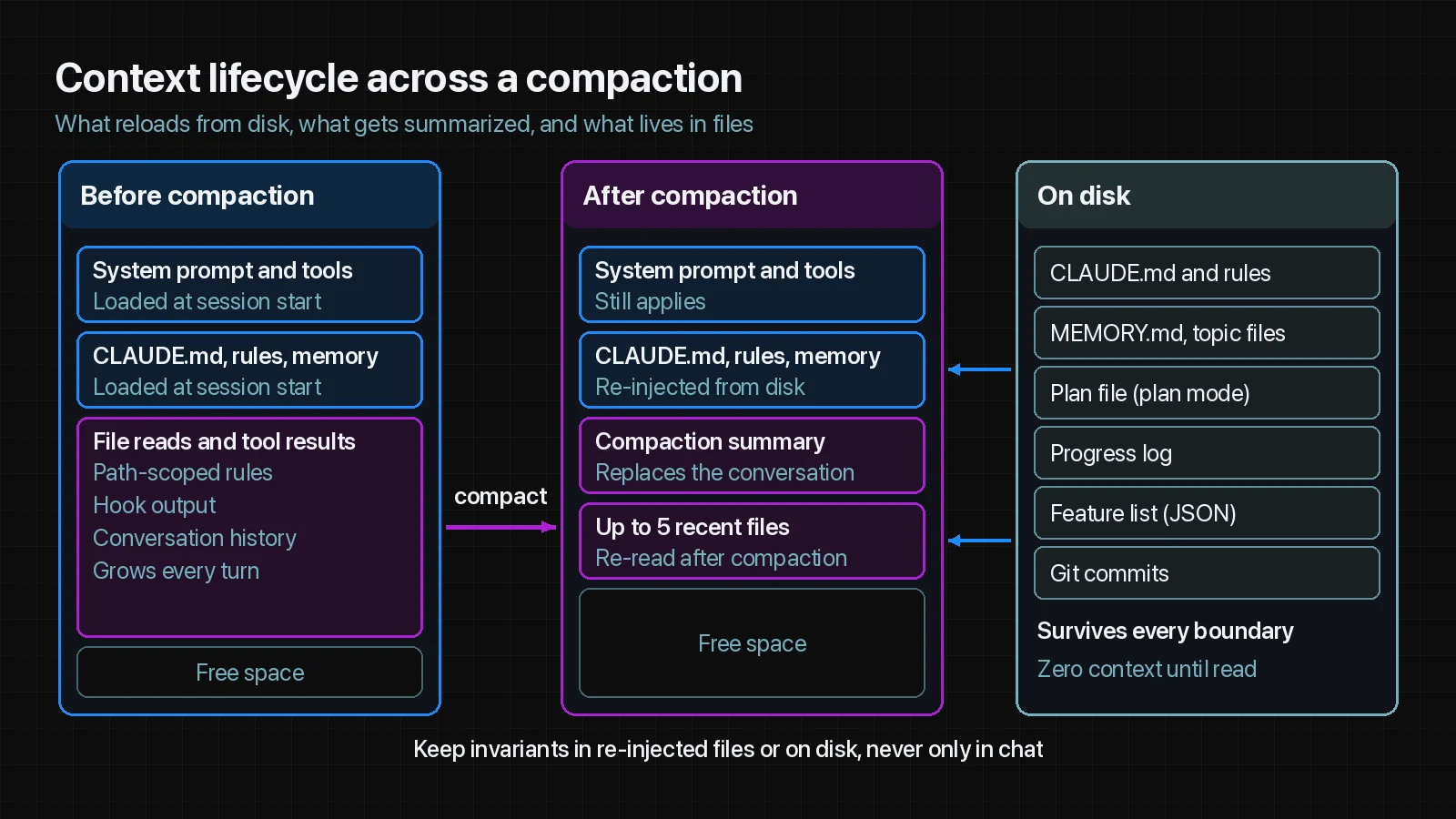
Context engineering is the discipline of deciding which tokens an agent sees at each step. Anthropic's Applied AI team defines it in Effective context engineering for AI agents as the set of strategies for curating and maintaining the optimal set of tokens during inference, including everything that lands in the window outside the prompt itself. For a coding agent that runs for hours, that set changes on every tool call.
This guide covers the runtime lifecycle of that set in Claude Code: what fills the window over a long session, how to read /context, when auto-compaction and manual /compact run and what they keep, which memory features carry knowledge across sessions, and how to hand a task from one context window to the next without losing architectural invariants. Two neighbouring decisions have their own articles. Which static instruction files load at startup, and what they cost, is covered in CLAUDE.md vs AGENTS.md: context architecture and token budgets. The startup overhead of MCP tool definitions is covered in MCP vs CLI: a token-cost hierarchy and an ADR.
Every limit, flag and behaviour below comes from Claude Code and Claude API documentation read on November 24, 2026. Claude Code ships often and several behaviours here carry a minimum version, so re-check the linked pages before you encode a number in team policy.
What is context engineering, and why does it matter for long sessions?
The case for treating context as a budget rests on one documented property of the models. The Claude API context window guide states that as token count grows, accuracy and recall degrade, a phenomenon it calls context rot, which makes curating what is in context as important as how much space is available. Anthropic's essay explains the mechanism: a transformer lets every token attend to every other token, so n tokens produce n squared pairwise relationships, and the result is a performance gradient rather than a hard cliff. Models stay capable at long lengths but may lose precision on retrieval and long-range reasoning.
The essay's guiding principle is to find the smallest possible set of high-signal tokens that maximizes the likelihood of the outcome you want. It also argues that waiting for larger windows is not a strategy, because windows of every size remain subject to context pollution. For long-horizon work it names three techniques, and Claude Code implements all three:
- Compaction. Summarize a conversation that is nearing the limit and continue in a fresh window with the summary. The essay says Claude Code preserves architectural decisions, unresolved bugs and implementation details while discarding redundant tool output, then continues with the five most recently accessed files.
- Structured note-taking. The agent writes notes to storage outside the window and reads them back later. In Claude Code that means auto memory, plan files and any progress file you ask it to maintain.
- Sub-agent architectures. Focused workers explore in clean windows and return a condensed summary, often 1,000 to 2,000 tokens according to the essay. The topology choices are compared in Claude Agent SDK vs subagents vs agent teams.
The essay's selection rule is worth adopting as a team default: compaction suits tasks with extensive back-and-forth, note-taking suits iterative development with clear milestones, and multi-agent designs suit research and analysis where parallel exploration pays off. Most long engineering sessions need all three, layered, and the rest of this article is about where each layer lives and what survives when the window turns over.
How much context window does Claude Code have?
On current models, 1 million tokens. The Claude API context window sizes list Claude Opus 5.5, Sonnet 5.5, Haiku 5.5, Fable 5.1 and the newer Fable 5.2 among the models with a 1M-token window, each able to generate up to 128k output tokens per request. Other models, including the deprecated Sonnet 4.5, have 200k. For every 1M model the full window is the default with no beta header, billed at standard rates except on Haiku 5.5, where prompts over 100,000 tokens cost more.
Claude Code's model configuration docs add the client-side details. Fable models, Sonnet 5 and later, Haiku 5.5 and Opus 4.7 and later run with the 1M window by default, including on Amazon Bedrock, Google Cloud's Agent Platform and Microsoft Foundry. Opus 4.6 and Sonnet 4.6 reach 1M only through a [1m] variant whose availability depends on your plan. Setting CLAUDE_CODE_DISABLE_1M_CONTEXT=1 holds every session to a 200K window.
The window is not the number that governs your session; the auto-compact point is. Per the default auto-compact thresholds, models with a native 1M window compact at about 967K tokens by default, while Sonnet 4.6 and Opus 4.6 without extended context compact at the 200K boundary. Behind an LLM gateway, Claude Code gives each model it recognizes the same window it has on the Anthropic API and cannot detect a lower limit the gateway enforces, so a gateway that rejects requests above 200K needs CLAUDE_CODE_AUTO_COMPACT_WINDOW=200000 in the environment that starts Claude Code.
| Model | API context window | Claude Code default window | Default auto-compact point |
|---|---|---|---|
| Claude Opus 5.5 | 1M tokens | 1M, no suffix needed | About 967K tokens |
| Claude Sonnet 5.5 | 1M tokens | 1M, no suffix needed | About 967K tokens |
| Claude Haiku 5.5 | 1M tokens; prompts over 100K cost more | 1M on every plan | About 967K tokens |
| Claude Fable 5.1 | 1M tokens | 1M, no suffix needed | About 967K tokens |
| Opus 4.6 and Sonnet 4.6 | 1M tokens | 200K unless you select the [1m] variant | 200K boundary without extended context |
Any model with CLAUDE_CODE_DISABLE_1M_CONTEXT=1 | Unchanged | 200K | 200K boundary |
Two caveats matter for capacity planning. Cloud sessions compact as the conversation approaches the model's limit rather than at a fixed point, and a session on a model ID Claude Code does not recognize compacts at whatever window it assumes for that ID; the same page documents modelOverrides and CLAUDE_CODE_MAX_CONTEXT_TOKENS for correcting it. A subagent also gets a window sized by its own model, not the parent session. The best practices guide sums up the practical effect: with a 1M window and compaction near the top of it, you will rarely run out of context, but you can still pay for context you do not need.
What fills the context window over a long session?
The context window walkthrough describes four phases. Before you type, CLAUDE.md, auto memory, MCP tool names and skill descriptions load, plus anything your setup adds, such as an output style or --append-system-prompt text. As Claude works, each file read adds to context, path-scoped rules load beside matching files, and hook output lands after edits. A subagent keeps its large reads in its own window and returns a summary. At compaction, the conversation is replaced by a structured summary and most startup content reloads.
The page's example session makes the shape concrete: 22,225 tokens in use before /compact and 17,095 after, including a 1,725-token conversation summary. Anthropic labels those counts illustrative, so treat them as a picture of proportions, not a benchmark. The architectural point is the asymmetry. The startup layers come back from disk, while everything learned in conversation survives only as far as the summary carries it.
That asymmetry gives five layers with different survival rules. The table maps each to its lifecycle and its controls, using the what survives compaction reference and the context cost by feature table.
| Layer | When loaded | Survives compaction? | Cost profile | How to control |
|---|---|---|---|---|
| System prompt and tool definitions | Session start. MCP tools are deferred by default, so only tool names and server instructions load until Claude uses a tool | Yes. The system prompt and output style still apply; skill descriptions are rebuilt and re-injected on v2.1.304 or later | Sent with every request; the cheapest layer while the prompt cache is warm | Disable unused MCP servers in /mcp, set disable-model-invocation: true on manual skills, prefer the Default output style, which loads nothing |
| Static rules: root CLAUDE.md, unscoped rules, auto memory index | Session start, including the first 200 lines or 25KB of MEMORY.md | Yes. Re-injected from disk | Every request; CLAUDE.md also loads in non-fork subagents other than the built-in Explore, Plan and web-fetch agents and any subagent with omitClaudeMd; auto memory does not | Keep CLAUDE.md under 200 lines, move procedures to skills and package conventions to paths: rules |
| Active file reads and tool results | As Claude works, including nested CLAUDE.md files, path-scoped rules and hook output | No. Summarized; up to five recently modified files are re-read, and path-scoped rules reload only when a matching file is touched again | Grows every turn and rides along on every later request | Targeted reads, subagents for large reads, /clear between unrelated tasks |
| Compaction summaries | When /compact, auto-compaction, idle compaction or a rewind summary runs | They become conversation history, so a later compaction summarizes them again | Producing one reads the whole conversation: cheap with a warm cache, full price when cold | Focus instructions, a Compact instructions section in CLAUDE.md, a PreCompact hook, /autocompact |
| Externalised state files | Written by Claude or your hooks during work; read on demand | Yes. They live on disk, and a plan written in plan mode is re-injected from disk | Zero context until Claude reads them, then the cost of that read | A handoff protocol: progress log, feature list, commits and a SessionStart hook with the compact matcher |
Three details in that reference cause most surprises. A re-read file over 5,000 tokens comes back only as a path reference, shown as Referenced file, so a large file Claude was editing is not actually back in context. Invoked skill bodies are re-injected but capped at 5,000 tokens per skill and 25,000 tokens in total, oldest dropped first, and truncation keeps the start of the file. Context that hooks added earlier is summarized with everything else, unless a SessionStart hook that matches the compact source runs again and re-adds it.
Background commands and background subagents keep running through compaction, and Claude Code reminds Claude which ones are still running so it does not start a duplicate. On the Claude API side, the context window guide adds that Opus 4.5 and later Opus models, Sonnet 4.6 and later, Haiku 5.5 and the Fable models keep previous thinking blocks by default, where they count toward the window like any other input. The costs guide notes that thinking cannot be turned off on Opus 5.5, Sonnet 5.5, Haiku 5.5 or the Fable models, so lower the effort level when deep reasoning is not needed.
How do you read /context, and what should you measure?
/context is the instrument; everything else is inference. The commands reference describes it as a colored grid of current usage with optimization suggestions for context-heavy tools, memory bloat and capacity warnings. /context all expands the per-item breakdown that fullscreen mode otherwise collapses, and the memory docs point to its Memory files list as the way to confirm which CLAUDE.md files actually loaded at launch.
Read it the way the troubleshooting guide does when diagnosing compaction thrashing: compare the Messages row with the rows above it. If Messages is the largest row, a file or tool output in the conversation is filling the window, and the fix is chunked reads, a focused compact or a subagent. If the startup rows together outweigh Messages, what loads at session start leaves too little room to work, and the fix belongs in your instruction files and tool configuration. When the conversation is already past the window, /context prints a warning such as Context exceeds the 200k-token limit by 94k tokens, per the error reference.
When the startup rows outweigh Messages, size the instruction files before the next session: the CLAUDE.md token budget checker gives an approximate token count per load and across subagents, and /context all gives the measured figure.
Three other readings complete the picture:
- Status line. Scripts can read
context_windowfields from the status line input, includingused_percentage, which is calculated from input tokens only: input plus cache creation plus cache read. WhileCLAUDE_CODE_AUTO_COMPACT_WINDOWis set, that percentage still measures against the full window, so it does not tell you when compaction will run. - Session usage.
/usageshows session cost for API users and, on v2.1.251 or later, aPrompt cache (main)line that counts misses and the expected rebuilds caused by compaction or tool-result clearing, per the costs guide. On Pro, Max, Ultra, Team and Enterprise plans its breakdown recommends a change for any behaviour behind 10% or more of recent usage, including long context and cache misses. - Spinner count. The token count beside the spinner measures output the current turn has produced, not context size, and it resets on compaction. It is not a context gauge.
What not to measure. No Anthropic source we checked publishes numbers for how much quality a compaction costs, and the essay frames the trade-off qualitatively: overly aggressive compaction can lose subtle context whose importance only appears later. Rather than quoting a degradation benchmark, instrument your own sessions. The signals worth collecting are listed in the invariants section below.
When should you compact, clear or rewind?
Claude Code compacts automatically as you approach the auto-compact window, so a full window does not end a session. Per How Claude Code works, the summary keeps your requests and key code snippets, but detailed instructions from early in the conversation may be lost. If a single file or tool output refills the window right after each summary, Claude Code stops after a few attempts with a thrashing error instead of looping.
Manual control beats waiting, because you choose both the timing and the emphasis. /compact focus on the auth bug fix keeps what you name instead of what the automatic pass guesses is important. A Compact instructions section in the project CLAUDE.md sets a standing default, and a PreCompact hook goes further: its stdout becomes instructions for the summary, capped at 10,000 characters per hook, and exiting with code 2 blocks compaction. A PostCompact hook receives the generated summary as compact_summary, which makes it the natural place to log summaries for review.
Timing also decides cost. The prompt caching guide explains that compaction sends a separate request repeating the system prompt, tools and the history being summarized. With a warm cache that request reads the prefix from cache and costs a fraction of what the context size suggests; after a break longer than the cache lifetime it reprocesses the history as uncached input. Compaction also invalidates the conversation layer of the cache, so the guide recommends compacting at a natural break between tasks. /clear costs nothing, and /rewind truncates back to a prefix that is already cached.
| Situation | Use | What it keeps | Cost note |
|---|---|---|---|
| Same task, long history, next phase starting | /compact with a focus | A summary, the re-injected startup layers and up to five recent files | One large summary request; cheapest while the cache is warm |
| Switching to unrelated work | /clear, optionally with a name for the session you leave | Nothing in context; the old session stays resumable | Free; resets the /usage session totals |
| A failed approach you want to abandon | /rewind, then Restore conversation | Everything before the chosen prompt | Reads the earlier cache entry instead of building a new one |
| Stale middle section, recent turns still useful | /rewind, then Summarize up to here | Later messages intact, earlier ones summarized | The original messages stay in the session transcript |
| Trying an alternative without losing the original | /branch or --fork-session | A copy of the history under a new session ID | The copy starts with the full history and its size |
| Window sized wrong for your model or gateway | /autocompact or CLAUDE_CODE_AUTO_COMPACT_WINDOW | Changes when auto-compaction runs | Minimum 100K; capped at the model window |
Two background behaviours belong in team policy rather than personal habit. Idle compaction is on by default for interactive sessions on the one-hour cache TTL: once a conversation reaches 200,000 tokens and sits idle for about an hour, it is compacted so you return to a summary. The settings reference documents idleCompaction: false (v2.1.290 or later) and the CLAUDE_CODE_IDLE_COMPACT_MIN_TOKENS threshold, which cannot go below 100,000.
The auto-compact window can be set per model with /autocompact, for every model with autoCompactWindow, for one launch with --autocompact, or in scripts with the environment variable, which takes precedence over the others. A subagent that reads long logs can compact earlier through an autoCompactWindow frontmatter value of 100000 or more, written as a plain integer, per the subagent docs.
Does Claude Code have project context across sessions?
Not in the conversation itself. How Claude Code works is explicit that each new session starts with a fresh context window, without the conversation history of previous sessions. Project context reaches a new session through three routes: the CLAUDE.md hierarchy you write, auto memory that Claude writes, and resuming a saved transcript. Within a session, Claude also reads the project files, git state and terminal it has access to.
Auto memory is the route most teams under-govern. Per the memory docs, it is on by default in local sessions and saves four types of notes: user, feedback, project and reference. It skips anything derivable from the code and anything CLAUDE.md already says. Each repository gets one directory under ~/.claude/projects/<project>/memory/, shared across worktrees. Only the first 200 lines or 25KB of the MEMORY.md index load at startup; topic files are read on demand, and anything past the limit is dropped on the next load.
- Machine-local. Auto memory is not shared across machines or cloud environments, so it cannot be a team source of truth. Promote anything the team needs into a committed CLAUDE.md or rules file.
- Persistent by default. Memory files are excluded from the transcript retention sweep and stay until someone edits or deletes them. Review them with
/memorythe way you would review any other configuration. - Not inherited by subagents. The main conversation auto memory is not loaded into subagents, except forks. A subagent can keep its own memory through the
memoryfield, scoped to user, project or local, and the subagent docs recommend project scope because it is shareable through version control. - Switchable. Turn it off per project with
autoMemoryEnabled: false, or per environment withCLAUDE_CODE_DISABLE_AUTO_MEMORY=1. Outside Claude Tag sessions, a session in a self-hosted environment runs with auto memory off by default.
Teams building their own agents on the Claude API get the same primitives as separate features. The memory tool (memory_20250818) is client-side: Claude requests file operations under a /memories prefix and your application executes them against storage you control. Server-side compaction summarizes older turns on the server and is in beta, and context editing clears old tool results or thinking blocks by rule. The memory tool page recommends combining them: compaction keeps the active context small, and memory preserves the information that must survive summarization.
How should a task cross a context boundary?
Compaction, /clear, a resumed session and a fresh subagent are all context boundaries, and Anthropic's own harness research says a summary alone is not enough. In Effective harnesses for long-running agents, Anthropic reports that a frontier model looping across many windows with only a high-level prompt failed in two ways: it tried to do too much at once and ran out of context mid-feature, and later sessions saw progress and declared the job done. The post notes this happened even with compaction, which does not always pass perfectly clear instructions to the next agent.
Their fix was environmental. An initializer session writes an init.sh script, a claude-progress.txt log and an initial git commit, plus a feature list in JSON with every item marked failing, which later sessions may change only by flipping a passes field. They chose JSON because the model was less likely to overwrite it inappropriately than Markdown. The memory tool guide generalizes the same pattern. Adapted to Claude Code, a handoff has four steps:
- Externalise state before the boundary. Ask Claude to update a progress log with what is done, what is next and any open decision, mark only verified items as passing in the feature list, and commit. Use plan mode for multi-step work, since the plan file is re-injected from disk after compaction.
- Pin invariants where compaction re-injects them. Architectural invariants go in the project-root CLAUDE.md or an unscoped rule, never only in chat and never in a
paths:rule that may not reload. Add a SessionStart hook with thecompactmatcher that prints the invariants and the tail of the progress file, and a PreCompact hook that tells the summary what it must keep. - Pick the boundary deliberately. Use
/compactwith a focus to continue the same task,/clearplus a short prompt that names the progress file for a new task, and/renamefollowed byclaude --resume <name>for work that spans days. Use/branchto explore an alternative without touching the original. - Verify on the far side before new work. Run
/context allto confirm the expected memory files loaded, have Claude restate the invariants and the next step from the progress file, and run a smoke test before starting a new feature. Log each PostCompact summary so a reviewer can see what survived.
The hooks for step 2 are a few lines of settings. This is an illustrative project .claude/settings.json. The hook events, the compact and auto matchers and the stdout behaviour are documented in the hooks reference and the hooks guide; the file paths are examples.
{
  "hooks": {
    "SessionStart": [
      {
        "matcher": "compact",
        "hooks": [
          {
            "type": "command",
            "command": "cat docs/agent/INVARIANTS.md; tail -n 20 docs/agent/progress.md"
          }
        ]
      }
    ],
    "PreCompact": [
      {
        "matcher": "auto",
        "hooks": [
          {
            "type": "command",
            "command": "echo 'Keep: invariants, open decisions, failing tests, files changed, next step. Drop: raw logs and superseded plans.'"
          }
        ]
      }
    ]
  }
}
Resuming has its own mechanics, and they are worth knowing before you rely on it. Per Manage sessions, a resumed session that was compacted opens at a Conversation compacted row and continues from the last summary plus the messages after it; the summarized messages are not loaded again. Flags such as --mcp-config, --add-dir, --settings and tool restrictions are not restored and must be passed again. On Pro, Max and Ultra plans, a dialog can estimate how much of the 5-hour usage limit the saved conversation alone would use.
Resuming after the cache lifetime reprocesses the full history, and the best practices guide notes that if you do not need the history at all, a fresh session still costs less. A good progress file is what makes the fresh session viable: it turns a resume decision into a cost decision instead of a continuity risk.
How do you prevent context rot without losing architectural invariants?
Context rot and lost invariants pull in opposite directions. Compacting often keeps the window sharp but gives the summarizer more chances to drop something. The resolution is to stop relying on the conversation for anything that must hold. The memory docs give the diagnostic directly: if an instruction disappeared after compaction, it was given only in conversation, lives in a nested CLAUDE.md that has not reloaded yet, or is a path-scoped rule that has not matched a file since.
These are the failure modes to design out:
- Chat-only rules. Anything typed as a correction lives in history and will be summarized. If it matters twice, it belongs in CLAUDE.md.
- Path-scoped invariants. A rule with
paths:frontmatter loads into message history when its trigger file is touched, so compaction summarizes it away. Drop the frontmatter or move the rule to the root CLAUDE.md if it must persist. - Long skills. Re-injected skill bodies are truncated to 5,000 tokens from the top, so put the non-negotiable instructions first in
SKILL.md. - Oversized working files. A file over 5,000 tokens returns after compaction as a reference, not content. Keep the active edit surface in smaller files or re-read the relevant range.
- An overgrown memory index. Lines past 200 or 25KB in
MEMORY.mdare dropped on the next load, and Claude Code returns an error telling Claude to rewrite the index when a write crosses the limit. - Instructions competing for attention. The memory docs note that CLAUDE.md is delivered as a user message after the system prompt, not as part of it, and that conflicting files may be resolved arbitrarily. Rules that can have no exceptions belong in hooks or permission rules.
Because no primary source publishes compaction degradation numbers, measure your own. Each of these signals comes from an output Claude Code already documents, so none needs new tooling:
- Compactions per task, from PostCompact hook logs or the
compact_boundaryentries withpreTokensthat subagent transcripts record. - An invariant recall check after each compaction: ask Claude to restate the rules that must hold and compare the answer with CLAUDE.md.
- Re-work after compaction: reverted commits or re-broken tests in the turns that follow a summary.
- The share of input served from cache in the
/usageprompt cache line, and how many expected rebuilds compaction caused. - The Messages share of the
/contextbreakdown at the moment you compact, and any thrashing errors.
Record the Claude Code version and model with every measurement. Re-injection of skill descriptions, idle compaction, the per-subagent window and the on-demand file size limit each arrived at a specific version, and the next release may move a threshold.
What should an engineering lead standardize?
Most of these controls are settings and files, so they can live in managed or project configuration instead of individual habit:
- Set
CLAUDE_CODE_AUTO_COMPACT_WINDOWfor any gateway that enforces a smaller limit than the model has on the Anthropic API. - Decide
idleCompactionand the main conversation cache TTL (promptCacheTtl) together, because idle compaction applies only on the one-hour TTL. - Ship a project CLAUDE.md with an invariants block and a Compact instructions section, plus the SessionStart and PreCompact hooks from the handoff section.
- Require a progress file and a feature list for any task expected to cross a context boundary, and review auto memory as configuration.
- Settle caching and model choice with the Claude 5.5 routing and prompt caching guide, since the cache TTL decides what a compaction or a resume costs.
Then test the handoff on one long task, document how many compactions it took and whether the invariants survived, and adjust the window and hooks from that record rather than from intuition. For how the same budgets work across many client repositories, read One Engine, Many Clients.
Primary sources checked November 24, 2026
- Anthropic Engineering: Effective context engineering for AI agents
- Anthropic Engineering: Effective harnesses for long-running agents
- Claude Code: Explore the context window (what survives compaction)
- Claude Code: How Claude Code works (sessions, context, compaction)
- Claude Code: Self-hosted environments configuration
- Claude Tag overview
- Claude Code: How Claude remembers your project (CLAUDE.md and auto memory)
- Claude Code: Manage costs effectively (/usage, reducing token usage)
- Claude Code: Commands reference (/compact, /context, /clear, /autocompact)
- Claude Code: Model configuration (extended context, auto-compact window)
- Claude Code: Manage sessions (resume, continue, branch)
- Claude Code: Checkpointing (rewind and summarize)
- Claude Code: Settings reference (idleCompaction)
- Claude Code: How Claude Code uses prompt caching
- Claude Code: Subagents (memory field, auto-compact window)
- Claude Code: Best practices (keep cost and context down)
- Claude Code: Extend Claude Code (context cost by feature)
- Claude Code: Status line (context window fields)
- Claude Code: Troubleshooting (auto-compaction thrashing)
- Claude Code: Error reference (prompt is too long, context exceeds limit)
- Claude Code: Hooks reference (PreCompact, PostCompact)
- Claude Code: Hooks guide (re-inject context after compaction)
- Claude API: Context windows
- Claude API: Compaction overview
- Claude API: Context editing
- Claude API: Memory tool
Frequently Asked Questions
How much context window does Claude Code have?
Current models such as Claude Opus 5.5, Sonnet 5.5, Haiku 5.5 and Fable 5.1 run in Claude Code with a 1 million token window by default, and auto-compaction runs at about 967K tokens. Opus 4.6 and Sonnet 4.6 need their [1m] variant, otherwise they use 200K. Setting CLAUDE_CODE_DISABLE_1M_CONTEXT=1 holds every session to 200K.
Does Claude Code have project context?
Yes, through files rather than memory of past chats. Each session starts with a fresh context window, then loads your CLAUDE.md hierarchy and the first 200 lines or 25KB of the auto memory index. During work Claude reads project files and git state on demand, and claude --resume reopens a saved session transcript.
What does /compact do in Claude Code?
It replaces the conversation history with a structured summary to free space. Optional focus instructions, such as /compact focus on the API changes, steer what the summary keeps. Afterwards the system prompt still applies, root CLAUDE.md, unscoped rules and auto memory are re-injected from disk, and Claude Code re-reads up to five recently modified files.
What is lost when Claude Code compacts?
Instructions given only in conversation, path-scoped rules and nested CLAUDE.md files until they reload, context that hooks added earlier, and the full text of old tool results. Files over 5,000 tokens come back only as a path reference. Put anything that must survive in root CLAUDE.md, an unscoped rule or a progress file.
How do I check Claude Code token usage?
Run /context for a live breakdown of what fills the window, and /context all for per-item detail. Run /usage for session cost, prompt cache statistics and, on subscription plans, a breakdown of what counts against plan limits. Status line scripts can also read context_window.used_percentage from the session JSON.
What is context engineering?
Anthropic defines context engineering as the strategies for curating and maintaining the optimal set of tokens an agent sees during inference, beyond the prompt itself. For long-horizon agents it combines compaction, structured note-taking to files outside the window, and subagents that explore in clean windows and return short summaries.