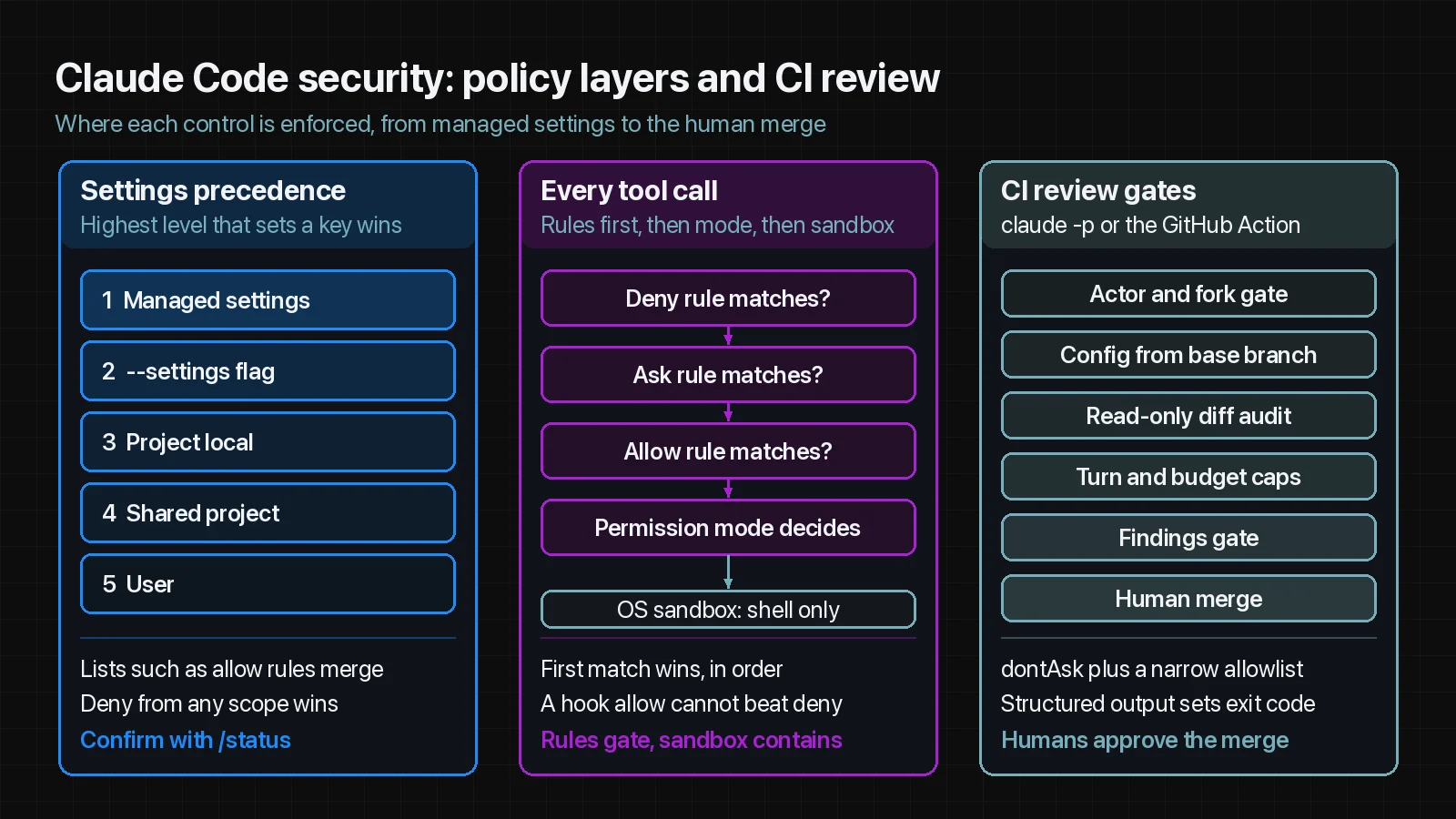
Claude Code security is configuration before it is behavior. What a session may read, run, fetch or push is decided by JSON settings files, a fixed precedence order, permission rules the client enforces, an optional OS sandbox and, in CI, the flags that launch claude -p. Prompts and CLAUDE.md shape what Claude tries; they do not grant or revoke anything. The permissions docs say it directly: permission rules are enforced by Claude Code, not by the model.
This guide is for the platform and security engineers who own that configuration. It covers the settings hierarchy and its precedence, allow, ask and deny rule syntax, permission modes, the keys only managed settings can set, sandbox settings, and pull request review pipelines built on claude -p, the Claude Code GitHub Action and the managed Code Review service. It stops at the edges of two neighboring guides: the threat taxonomy and PreToolUse circuit breakers live in Architecting for Agentic Risk, and tenant and account isolation live in Multi-Tenant Claude Code Architecture. Scanning third-party skills before you install them is covered on ClaudeSkillsGitHub.com.
Every key, flag and behavior below was checked against the linked Claude Code documentation and the official claude-code-action repository on November 24, 2026. Claude Code ships often and several of these behaviors changed in recent versions, so the version numbers matter: pin a minimum version in managed settings before you rely on any of them.
Which Claude Code settings file wins when two scopes disagree?
Claude Code reads settings from user, shared project and project local files, from a --settings argument and from managed policy, and the settings precedence docs put them in one stack. When the same key appears at more than one level, the highest level that sets it wins. Environment variables are not a level in this stack: each variable and its paired key are resolved pair by pair, so ANTHROPIC_MODEL exported in a shell beats the model key from any file.
| Rank | Level | Where it lives | Who controls it | What it can and cannot do |
|---|---|---|---|---|
| 1 | Managed settings | managed-settings.json in /Library/Application Support/ClaudeCode/ on macOS or /etc/claude-code/ on Linux and WSL, an MDM profile or registry policy, or server-managed settings from the claude.ai admin console | Organization administrators | Overrides the same key at every level below; a few security keys still honor a stricter value from a lower level |
| 2 | Command line | --settings <file-or-json> at launch | Whoever starts the session, including a CI job definition | Overrides project and user files for one session; cannot set managed-only keys |
| 3 | Project local | .claude/settings.local.json | The individual developer | Personal override for one project; Claude Code keeps it out of git when it creates the file |
| 4 | Shared project | .claude/settings.json, committed to the repository | The team, through code review | Allow rules wait for workspace trust; deny and ask rules apply at once |
| 5 | User | ~/.claude/settings.json | The individual developer | Personal defaults for every project on the machine |
Three behaviors change how the stack plays out in practice:
- Lists merge instead of overriding.
permissions.allow,permissions.denyand similar arrays combine across every file that sets them, so a lower scope can add entries without removing anyone else's. A few model keys follow their own rules, and a managedavailableModelslist is applied as delivered. - Some security keys honor the stricter value from any scope.
permissions.blockReadsOutsideWorkingDirectoriesset totrue,disableClaudeAiConnectorsset totrueand a lowermaxEffortLevelwin even over a managed value, per the documented exceptions table. A developer can tighten those keys but never loosen them. - Some values cannot come from a repository. The
permissions.defaultModevaluesautoandbypassPermissionsdo not take effect from project or local settings (before v2.1.257,bypassPermissionsdid), and telemetry export variables in a repositoryenvblock are ignored apart from a few off values.
Precedence inside the managed tier
An organization can deliver policy several ways, and by default Claude Code applies only one of them. The managed settings docs rank remote settings (server-managed from claude.ai or a Claude apps gateway) first, then MDM or OS policy (a macOS configuration profile or the Windows HKLM key), then managed settings files, then the user-writable Windows HKCU key. Under the default managedSourcesBehavior value, "first-wins", the highest-ranked source that delivers any policy key is applied and the rest are skipped without a warning. The "merge" value (v2.1.242 or later) composes every admin source instead, with lists unioned and locks taking the strictest value. File-based policy can be split across teams with a managed-settings.d/ directory whose *.json files merge alphabetically after managed-settings.json.
Delivery timing differs by channel: server-managed settings are fetched at startup and polled hourly, MDM policy is checked every 30 minutes, and files reload when they change. To see what actually applied on a machine, run /status and read the Setting sources line, which names the selected source in parentheses, such as (remote), (plist) or (file). On v2.1.242 or later a second Skipped sources line names any managed source Claude Code found but did not select. claude doctor lists the entries Claude Code rejected.
How do allow, ask and deny permission rules evaluate?
A permission rule is a tool name, optionally with a specifier: Bash, Bash(npm run *), Read(./.env), WebFetch(domain:example.com) or mcp__github__*. Per the permissions docs, rules are evaluated in a fixed order, deny then ask then allow, and the first match decides. Specificity does not reorder them: a broad deny such as Bash(aws *) blocks aws s3 ls even when a narrower allow rule names it, and a matching ask rule prompts even when an allow rule also matches. A bare tool name in a deny rule removes the tool from Claude's context entirely, while a scoped deny leaves the tool available and blocks only matching calls.
Because deny is evaluated first from every scope, a deny in user settings blocks an allow in project settings, and the reverse. A managed deny cannot be overridden by --allowedTools, while --disallowedTools can add restrictions on top of managed policy. A PreToolUse hook cannot overrule a deny or ask rule either: the docs state that hook decisions do not bypass permission rules.
There is one more reason to deploy managed settings at all. In a setup with no managed settings, no managed-mcp.json file and no Team or Enterprise login as the session credential, an installed mod (a plugin that runs its own code inside Claude Code) can approve some calls that a deny rule refuses. With any of those three in place, a call a deny rule refuses stays refused.
Rule patterns that do not mean what they look like
Most policy bugs are matching bugs. Bash rules match the command text after Claude Code splits compound commands on &&, ||, ;, |, |&, & and newlines, and strips a fixed set of wrappers such as timeout, nice and nohup. They do not match the same program invoked another way, and the docs warn that a Bash deny or ask rule covers the invocation Claude usually produces and "isn't a security boundary around the program". Read and Edit rules use gitignore syntax with four anchors, and the single-slash form is the classic trap.
| Rule | Matches | Does not match |
|---|---|---|
Bash(git push *) in deny | git push origin main | git -C . push origin main or git -c push.default=current push origin main |
Bash(curl *) in deny | curl https://example.com | /usr/bin/curl https://example.com or a sh -c wrapper around curl |
Bash(ls *) | ls -la and bare ls | lsof, because the space before * is part of the rule |
Read(./.env) in deny | File-tool reads, cat .env, and Edit or Write on the same path | grep -r run over the directory that holds it, or a Python script that opens the file itself |
Read(/secrets/**) in user settings | ~/.claude/secrets/**, because a single slash anchors at the settings source | A secrets folder in your project; use // for absolute paths or ~/ for home |
Grep(docs/**) in deny | Nothing: Write, Glob and Grep path rules are accepted but never matched | Searches of docs; write Read(docs/**) instead |
WebFetch(domain:*.example.com) | api.example.com and a.b.example.com | example.com itself |
"*" or "mcp__*" in allow | Nothing: unanchored allow globs are skipped | Any tool; allow globs need a literal mcp__<server>__ prefix |
The fix for the Bash rows is not a longer list of patterns. For filesystem and network limits that do not depend on command text, the docs point to the sandbox; for custom inspection of the full command, to a PreToolUse hook. The working design rule: deny rules handle the invocations Claude normally writes, and the sandbox provides the guarantee.
A shared project baseline
This team file uses only keys and value shapes shown in the example settings files and the permissions docs. It lets npm scripts and commits run, forces a prompt before any push, keeps secret files away from the file tools, and turns on the sandbox with a one-entry network allowlist. Commit it at .claude/settings.json and review changes to it like production code.
{
  "$schema": "https://json.schemastore.org/claude-code-settings.json",
  "permissions": {
    "allow": ["Bash(npm run *)", "Bash(git commit *)"],
    "ask": ["Bash(git push *)"],
    "deny": [
      "Read(./.env)",
      "Read(./.env.*)",
      "Read(./secrets/**)"
    ]
  },
  "sandbox": {
    "enabled": true,
    "network": {
      "allowedDomains": ["registry.npmjs.org"]
    }
  }
}
Workspace trust, and what a repository can run without it
Project allow rules grant capability, so Claude Code applies permissions.allow and permissions.additionalDirectories from .claude/settings.json only after a developer accepts the workspace trust dialog for that folder. Deny and ask rules apply immediately because they only restrict. The catch for automation is that claude -p and the Agent SDK never show the trust dialog. Per the trust table in the permissions docs, a -p run in a folder nobody trusted ignores the repository's allow rules with a stderr warning, yet still runs the hooks in its settings files, applies its env block and helpers such as apiKeyHelper, and connects every server in its .mcp.json without asking.
That makes the checkout itself an input to your CI security model. Before running claude -p against code you did not write, the documented options are:
--setting-sources user, so Claude Code reads neither the project's settings files nor its.mcp.json.--bare, which skips auto-discovery of hooks, skills, plugins, MCP servers, auto memory and CLAUDE.md. The projectenvblock still applies, and for the Anthropic API bare mode authenticates only withANTHROPIC_API_KEYor anapiKeyHelperpassed in--settings.--settings '{"disableAllHooks": true}'for the run. Setting it only in user settings is not enough, because project settings outrank user settings and can set it back.- A
disabledMcpjsonServersentry, which rejects a named.mcp.jsonserver in every session type.
Which permission mode belongs in which environment?
Permission modes set the baseline for calls that no rule decides. The permission modes docs list six. Two defaults matter for governance: interactive terminal and VS Code sessions start in auto on v2.1.283 or later, while claude -p and Agent SDK runs with no mode set start in Manual (config value default) on v2.1.302 or later, where any call that needs approval is denied unless a rule, hook or prompt tool approves it.
| Mode | Runs without asking | Fits | Governance note |
|---|---|---|---|
default (Manual) | Reads in the working directories and actions that need no approval | Sensitive work; the -p default | Calls needing approval prompt, or are denied in -p |
acceptEdits | Reads, file edits and common filesystem commands such as mkdir and mv | Iterating on code under review | Other shell commands and network requests still need a rule |
plan | Reads, plus classifier-approved commands when auto mode is available | Exploration before change | Keeps its blocks in -p, Agent SDK and VS Code chat sessions |
auto | Most actions, after a background classifier review | Long interactive tasks | A review, not a boundary; remove it with disableAutoMode |
dontAsk | Reads and pre-approved tools; anything that would prompt is denied | Locked-down CI and scripts | Ask-rule matches, AskUserQuestion and protected-path writes are denied |
bypassPermissions | Everything except the actions no mode auto-approves | Isolated containers and VMs only | Allow rules have no effect; remove it with disableBypassPermissionsMode |
Three governance details sit underneath the table. First, deny rules block in every mode, and explicit ask rules, recognized critical-path rm removals and tools that require user interaction are never auto-approved by any mode. Second, protected paths such as .git, .claude, .vscode, .husky and .devcontainer get their own per-mode rule, and permissions.allow entries do not pre-approve writes to them. Third, because defaultMode values auto and bypassPermissions are ignored in project and local files, a repository cannot switch a developer into either mode.
Both mode locks take the string "disable": permissions.disableBypassPermissionsMode and disableAutoMode (also accepted as permissions.disableAutoMode). They work from any scope but belong in managed settings, where nobody below can override them. For unattended runs, permissions.denyInsteadOfPrompting in user or managed settings, or the one-run flag --permission-prompts none (v2.1.259 or later), turns any call that would wait on a prompt into a denial instead of a stalled job.
What can only managed settings enforce?
Ordinary keys such as permissions.deny or sandbox.network.allowedDomains can be set at any level and merge across levels. What managed settings add is a set of keys that Claude Code reads only from a managed source; placed in a user or project file they do nothing. Most are locks that tell Claude Code to honor only the managed copy of an ordinary key. The managed settings docs list them all; these are the ones a security architecture usually needs:
allowManagedPermissionRulesOnly: managed settings become the only source of permission rules. Rules in user, project, local and--settingsfiles are ignored,--allowedToolsis ignored, and the always-allow options disappear from prompts.--disallowedToolsand session deny rules still apply because they only restrict.allowManagedHooksOnly: restricts which hooks run.allowManagedMcpServersOnly: only the managedallowedMcpServerslist is respected, whiledeniedMcpServersstill merges from every source.strictKnownMarketplacesandblockedMarketplaces: control which plugin marketplace sources users can add and install from.disableSideloadFlagsrejects the--plugin-dir,--plugin-url,--agentsand--mcp-configflags at startup.strictPluginOnlyCustomization: blocks skills, agents, hooks and MCP servers from user and project sources.sandbox.network.allowManagedDomainsOnlyandsandbox.filesystem.allowManagedReadPathsOnly: honor only the managed domain and read-path allowlists.forceRemoteSettingsRefresh: blocks startup until server-managed settings are freshly fetched, and exits if the fetch fails.
The lock-in trade-off
Design decision. allowManagedPermissionRulesOnly is the strongest lever and the most disruptive one. Without it, managed deny and ask rules still hold, because deny wins from any scope, but developers and repositories can add allow rules that widen what runs without a prompt. With it, every allow rule a team needs must live in managed policy, including the ones CI jobs pass with --allowedTools, which the lock ignores. A workable split is to lock rules on CI runners and other unattended hosts, where the allowlist is short and stable, and leave developer laptops on merged rules with a managed deny list, the bypass lock and an admin-required sandbox.
The policy below is illustrative, not a recommended baseline: every key appears in the settings reference or its examples, and the values are placeholders to adapt. Deploy it only to macOS, Linux and WSL machines, because the sandbox does not run on native Windows and failIfUnavailable makes Claude Code exit there.
{
  "permissions": {
    "deny": [
      "Read(./.env)",
      "Read(./.env.*)",
      "Read(./secrets/**)",
      "Bash(curl *)"
    ],
    "disableBypassPermissionsMode": "disable"
  },
  "allowManagedHooksOnly": true,
  "allowManagedMcpServersOnly": true,
  "allowedMcpServers": [
    { "serverUrl": "https://api.githubcopilot.com/*" }
  ],
  "sandbox": {
    "enabled": true,
    "failIfUnavailable": true,
    "allowUnsandboxedCommands": false,
    "credentials": {
      "files": [
        { "path": "~/.aws/credentials", "mode": "deny" },
        { "path": "~/.ssh", "mode": "deny" }
      ],
      "envVars": [
        { "name": "GITHUB_TOKEN", "mode": "deny" }
      ]
    },
    "network": {
      "allowedDomains": ["registry.npmjs.org"],
      "allowManagedDomainsOnly": true
    }
  },
  "requiredMinimumVersion": "2.1.302"
}
How managed policy fails
Managed settings tolerate bad entries in a way user and project files do not, and the direction of each fallback matters. On v2.1.282 or later, a lock key with an unreadable value reads as its restrictive value, an unreadable deny or ask list withholds the allow list beside it, and an invalid allowedMcpServers is enforced as an empty allowlist. A managed file that is not valid JSON makes Claude Code refuse to start. Two keys fail open by design: requiredMinimumVersion and requiredMaximumVersion are dropped when invalid.
Server-managed settings need their own failure plan. By default, a failed startup fetch falls back to the cached copy, and with no valid cache the session runs without server-managed policy; forceRemoteSettingsRefresh: true makes the client exit instead. The server-managed settings docs are explicit that this channel is "a client-side control, not a security boundary": on an unmanaged device a user can edit the cache until the next fetch, run an older or modified binary, or switch to a third-party provider. Endpoint-managed files protected by MDM are the stronger guarantee.
The CI credential gap
Server-managed settings reach a session only through the organization that owns its credential. A Claude Console API key belongs to a separate Console organization, so policy set in claude.ai admin settings does not reach a CI job that authenticates with your company's Console key, and exporting a CLAUDE_CODE_USE_* provider variable or a non-default ANTHROPIC_BASE_URL skips the fetch entirely. The documented fixes are an OAuth token from claude setup-token, authorized for your Team or Enterprise organization and set as CLAUDE_CODE_OAUTH_TOKEN, or a managed settings file baked into the runner image. Bare mode does not read CLAUDE_CODE_OAUTH_TOKEN, so a --bare job needs the file.
Where does the sandbox sit relative to permission rules?
Permission rules decide whether a tool call runs, judged from the call before it runs. The sandbox constrains what a shell command can reach while it runs, enforced by Seatbelt on macOS and bubblewrap on Linux and WSL2, so it holds even when an allowed command does more than its name suggests. It is off by default, covers Bash, PowerShell and Monitor commands and their child processes, and does not run on native Windows. Claude's own Read, Edit, Write and WebFetch tools, hooks, local MCP servers and mods run outside it and follow permission rules instead.
Default reach is narrower for writes than for reads. Sandboxed commands can write to the working directory, a per-user temp directory and added directories, but can read most of the machine, including ~/.ssh and ~/.aws/credentials, until you add filesystem.denyRead or credentials entries. Network traffic leaves only through a local proxy that checks hostnames against an allowlist that starts empty. Paths and domains from sandbox settings and from permission rules, such as Edit allow rules and WebFetch(domain:...) allow rules, merge into one sandbox configuration.
Two settings turn a developer convenience into an organizational control. failIfUnavailable makes Claude Code refuse to start rather than fall back to unsandboxed execution, and allowUnsandboxedCommands: false removes the escape hatch that lets Claude retry a failing command outside the sandbox. Setting the latter in managed settings, or allowManagedDomainsOnly: true, makes the sandbox admin-required on v2.1.285 or later, and Claude Code then ignores the loosening keys in a repository's settings files, including excludedCommands, network.allowedDomains and filesystem.allowWrite. Approved tools that need an exception must then be listed in managed settings.
Know the documented limits before you call it a boundary. The proxy decides from the client-supplied hostname and does not inspect TLS by default, so a broad entry such as github.com can become an exfiltration path, and allowing a socket such as /var/run/docker.sock effectively grants access to the host. To put hooks, MCP servers and the file tools behind the same wall, run the whole Claude Code process in a container, a VM or the sandbox runtime. Where that outer boundary should sit for your blast radius is covered in the agentic risk guide.
How should a CI pull request review pipeline be gated?
Claude can reach a pull request through several documented routes, which differ mainly in where the code runs and who holds the controls:
- Code Review, the managed service for Team and Enterprise plans on GitHub, described in the Code Review docs. Several agents examine the diff and surrounding code on Anthropic infrastructure, a verification step filters false positives, and findings post as inline comments ranked Important, Nit or Pre-existing. Repository access inside a review is read-only, a review never builds or runs your code, and it reads
REVIEW.mdonly from the base or default branch, never from the pull request. - The Claude Code GitHub Action,
anthropics/claude-code-action@v1, which runs Claude Code on your own runners, either in interactive mode on an@claudemention or in automation mode with apromptinput. See the GitHub Actions docs. - Headless Claude Code in any CI system:
claude -pwith controls you assemble from CLI flags. - The security review action,
anthropics/claude-code-security-review, whose README states it is not hardened against prompt injection and should review trusted pull requests only. - Local commands:
/code-reviewin a session on any plan, and/security-reviewfor an on-demand security pass over the current branch.
Whichever route you pick, build the pipeline as a series of gates, each owned by a documented control, rather than trusting one prompt to be careful. The table maps each stage to the capability that implements it and the failure mode to design for.
| Stage | Purpose | Documented controls | Failure mode to design for |
|---|---|---|---|
| 1. Actor and fork gate | Only trusted people start runs | The Action checks write access and rejects bots not listed in allowed_bots; allow_fork_prs defaults to false. Code Review skips drafts and forks automatically, and comment commands need write access | A skipped fork run succeeds with empty outputs, so a required check that only runs the Action passes with no review |
| 2. Config provenance | The pull request cannot rewrite Claude's own configuration | The Action restores .claude/, .mcp.json, CLAUDE.md, AGENTS.md and related paths from the base branch. For raw claude -p, use --bare or --setting-sources user | Hooks that call npm run or make still resolve through files the pull request supplies |
| 3. Read-only diff audit | Claude reads the change and never executes it | --permission-mode dontAsk with a narrow --allowedTools list; --disallowedTools for pushes; restrict_untrusted_prs (default true) denies package managers, test runners and interpreters for authors without write access | That command denylist is a list of common commands, not a sandbox, and the Action defaults to auto mode unless you set another mode |
| 4. Budget ceiling | Bound spend per run and per month | --max-turns, --max-budget-usd, workflow timeouts and concurrency limits; Console workspace spend limits; the Code Review monthly spend limit | --max-budget-usd checks a client-side estimate, and spend can pass the cap |
| 5. Findings gate | Turn findings into pass or fail | --json-schema returns structured_output; Code Review exposes severity counts on its check run; the security review action outputs findings-count | The Code Review check run never concludes as a failure by itself, and a missing severity line means no verdict, not zero findings |
| 6. Human approval | A person decides the merge | The Action does not open pull requests in its default configuration; a Code Review result does not approve or block by itself; branch protection and required reviews on the default branch | Review comments are advisory: without branch protection, a pull request with an Important finding can still merge |
A reference workflow with the GitHub Action
This workflow starts from the documented code-review plugin example and adds the opt-outs and caps the Action usage guide and GitHub Actions docs recommend. --permission-mode default replaces the Action's auto-mode default, so the allowlist acts as a strict list and anything no rule covers is denied. --max-turns bounds iterations, and the job timeout and concurrency group bound runner time and parallel runs. The workflow token stays read-only; the Action authenticates to GitHub as the Claude GitHub App unless you pass github_token.
It reviews on open, reopen and ready-for-review only. Add synchronize to the event types to review every push, at a multiple of the cost shown in the arithmetic below.
name: Claude PR review
on:
  pull_request:
    types: [opened, ready_for_review, reopened]
concurrency:
  group: claude-review-${{ github.event.pull_request.number }}
  cancel-in-progress: true
jobs:
  review:
    runs-on: ubuntu-latest
    timeout-minutes: 15
    permissions:
      contents: read
      pull-requests: read
      issues: read
      id-token: write
    steps:
      - uses: actions/checkout@v6
        with:
          fetch-depth: 1
      - uses: anthropics/claude-code-action@v1
        with:
          anthropic_api_key: ${{ secrets.ANTHROPIC_API_KEY }}
          plugin_marketplaces: "https://github.com/anthropics/claude-plugins-official.git"
          plugins: "code-review@claude-plugins-official"
          prompt: "/code-review:code-review --comment ${{ github.repository }}/pull/${{ github.event.pull_request.number }}"
          claude_args: >-
            --permission-mode default
            --max-turns 15
            --allowedTools "mcp__github_inline_comment__create_inline_comment"
A reference job for any CI system
Outside GitHub Actions, or when you want every control visible in one command, the same gates map onto headless flags. This job runs in bare mode so the checkout's hooks, skills, plugins and .mcp.json never load, restricts the built-in tools to Read and Bash, pre-approves only reads and two git inspection commands, denies everything else that would prompt, and caps turns and estimated spend. The schema forces a machine-readable verdict, and the last line turns it into an exit code, so a run that returns no verdict fails the job. Bare mode also skips CLAUDE.md, so pass review conventions with --append-system-prompt-file from a file the pull request does not control, such as one fetched from the default branch.
For the strictest harness on a shared machine, --restricted (v2.1.248 or later) removes the built-in tools that run commands or code, and WebFetch, unless you name them in --tools, confines the file tools to the working directories, loads only managed settings and --settings, and refuses bypassPermissions.
# Any CI system: a read-only, capped review of the current branch.
claude --bare -p "Review the changes between origin/main and HEAD for bugs and security issues. Do not modify files." \
  --permission-mode dontAsk \
  --tools "Read,Bash" \
  --allowedTools "Read" "Bash(git diff *)" "Bash(git log *)" \
  --disallowedTools "mcp__*" \
  --max-turns 12 \
  --max-budget-usd 2.00 \
  --no-session-persistence \
  --output-format json \
  --json-schema '{"type":"object","properties":{"blocking":{"type":"integer"},"findings":{"type":"array","items":{"type":"object","properties":{"file":{"type":"string"},"severity":{"type":"string","enum":["blocking","minor"]},"issue":{"type":"string"}},"required":["file","severity","issue"]}}},"required":["blocking","findings"]}' \
  > review.json

# Fail the job unless the run returned a verdict with zero blocking findings.
jq -e '.structured_output.blocking == 0' review.json
Cost gates: count runs before you price them
Neither route has a flat per-review price. Per the Code Review costs page, the managed service bills token usage through usage credits, scaled by review level, change size and how many candidate issues need verification, and a repository you add starts at After every push, the setting that runs the most reviews. A self-hosted workflow bills API tokens plus runner minutes. In both cases the number of runs is the first lever, and it is plain arithmetic.
Illustrative example, not a measurement. Assumptions: 400 pull requests a month, an average of 3 pushes after each pull request opens, and a self-hosted job capped at an assumed --max-budget-usd 2.00. The ceiling column is runs multiplied by the cap. It is not a forecast: most runs should stop well below the cap, and the CLI reference warns that spend can pass it.
| Trigger policy | Reviews per pull request | Runs per month | Nominal ceiling |
|---|---|---|---|
| Review on open, reopen or ready for review, $2.00 cap | 1 | 400 | $800 |
| Review on open and on every push, $2.00 cap | 4 | 1,600 | $3,200 |
| Every push, cap lowered to $1.00 | 4 | 1,600 | $1,600 |
| Manual request only, assumed on 1 in 4 pull requests, $2.00 cap | 0.25 | 100 | $200 |
For the managed service, the equivalent controls are the per-repository Review runs setting, the review level, and an organization-wide Code Review monthly spend limit. When that limit, the organization spend limit or the credit balance runs out, reviews are skipped and the pull request gets a comment naming the cause. The admin settings show each repository's average cost per review, and the docs recommend a pilot on Once after PR creation or Manual before a wide rollout. For self-hosted runs on API keys, Console workspace spend limits add a monthly ceiling above the per-run cap. Model choice and prompt caching move the per-run number; the Claude 5.5 routing and caching guide covers that layer.
Untrusted pull requests
Forks and outside contributors are where review pipelines are most exposed, and the documented defaults now lean toward safety. On public repositories GitHub withholds secrets from runs triggered by fork pull requests. The Action skips fork pull requests unless allow_fork_prs is "true", restores Claude's configuration from the base branch, and denies commands that commonly run repository code when the author lacks write access. Its security guide is blunt about pull_request_target and workflow_run: both run with the base repository's secrets, so never check out an untrusted ref into the workspace root before the Action runs. Check out the base ref, and pass the head into a subdirectory with --add-dir if Claude needs the files.
Prompt injection is the residual risk no setting removes. The Action strips HTML comments, invisible characters and hidden attributes from untrusted content, but its docs warn that new bypass techniques may emerge, and include_comments_by_actor can limit whose comments reach Claude on public repositories. Keep the tools a review job holds to the minimum, keep secrets out of its environment where you can, and treat any text from a pull request as data, not instructions.
What should a security architect standardize first?
- Inventory what applies today. On representative laptops and every CI runner image, run
/statusfor theSetting sourcesline andclaude doctorfor rejected entries and the organization policy status. - Ship a managed baseline: a deny list for secret paths,
disableBypassPermissionsMode,requiredMinimumVersion, and an admin-required sandbox on macOS, Linux and WSL machines. - Decide where
allowManagedPermissionRulesOnlyapplies. Lock rules on unattended hosts first, and carry the allow rules your CI jobs need into that policy. - Commit a shared
.claude/settings.jsonper repository with team allow, ask and deny rules, and route changes under.claude/through the same review as production code. - Close the CI credential gap: bake a managed settings file into runner images, and run
claude -pon untrusted checkouts with--bareor--setting-sources user. - Build the review pipeline as gates: actor and fork checks, base-branch configuration, a read-only tool set, turn and budget caps, a findings gate on structured output, and branch protection for the human merge.
- Audit drift. Use
ConfigChangehooks to log or block settings edits during sessions and OpenTelemetry metrics for usage, and record each policy decision as an ADR so the reasoning survives the next version change.
For how these controls sit beside tripwires and approval lanes, read Three-Lane Agent Governance. For headless billing and sandbox defaults across vendors, compare Claude Code vs Codex vs Cursor. For why CLAUDE.md is guidance rather than enforcement, see CLAUDE.md vs AGENTS.md. Test one policy on one repository, document the before and after, then roll it out.
Primary sources checked November 24, 2026
- Claude Code: Settings files and precedence
- Claude Code: All settings (settings reference)
- Claude Code: Example settings files
- Claude Code: Configure permissions
- Claude Code: Choose a permission mode
- Claude Code: Deploy managed settings
- Claude Code: Configure server-managed settings
- Claude Code: Set up Claude Code for your organization
- Claude Code: Security
- Claude Code: Configure the sandboxed Bash tool
- Claude Code: Run Claude Code programmatically (headless)
- Claude Code: CLI reference
- Claude Code: GitHub Actions
- Claude Code: Code Review
- Claude Code: Code Review costs and usage
- Claude Code: Read and request reviews on a pull request
- Claude Code: Customize Code Review
- Claude Code: Manage costs effectively
- GitHub: anthropics/claude-code-action (README)
- GitHub: claude-code-action security guide
- GitHub: claude-code-action usage guide
- GitHub: anthropics/claude-code-security-review (README)
Frequently Asked Questions
What is the Claude Code settings precedence order?
From highest to lowest: managed settings, command-line settings passed with --settings, project local settings in .claude/settings.local.json, shared project settings in .claude/settings.json, and user settings in ~/.claude/settings.json. The highest level that sets a key wins, list keys such as permissions.allow merge across levels, and environment variables are resolved separately, pair by pair.
Can a repository override my organization's managed settings?
No. Nothing in user, project, local or --settings files overrides a managed key, although lists such as permissions.allow still merge unless a lock like allowManagedPermissionRulesOnly is set. A few security keys honor a stricter value from a lower level, so a repository can tighten them but not loosen them. Deny rules from any scope run first.
Is it safe to run claude -p on pull requests from forks?
Only with deliberate controls. A -p run never shows the workspace trust dialog, yet it runs repository hooks and connects .mcp.json servers. Use --bare or --setting-sources user, a read-only tool list in dontAsk mode, and keep secrets out of the job. The GitHub Action skips forks by default and restores Claude configuration from the base branch.
What is the difference between Claude Code Review and the Claude Code GitHub Action?
Code Review is a managed service for Team and Enterprise plans that reviews GitHub pull requests on Anthropic infrastructure with read-only access, billed through usage credits. The GitHub Action runs Claude Code on your own runners, where you control the prompt, tools, permission mode and caps, billed to your API key or subscription.
Do Claude Code deny rules stop a command that is run another way?
Not reliably. A Bash deny rule matches the command text Claude writes, so Bash(curl *) does not stop /usr/bin/curl or a sh -c wrapper. Treat deny rules as guardrails for the usual invocation, and use the OS sandbox with a network allowlist, or a PreToolUse hook, when the restriction must hold.
How do I cap what a Claude Code CI review costs?
Limit runs first by choosing which pull request events trigger a review. Then cap each run with --max-turns and --max-budget-usd, add workflow timeouts and concurrency limits, and set a Console workspace spend limit or the Code Review monthly spend limit. The budget flag checks an estimate, so leave headroom below your real ceiling.