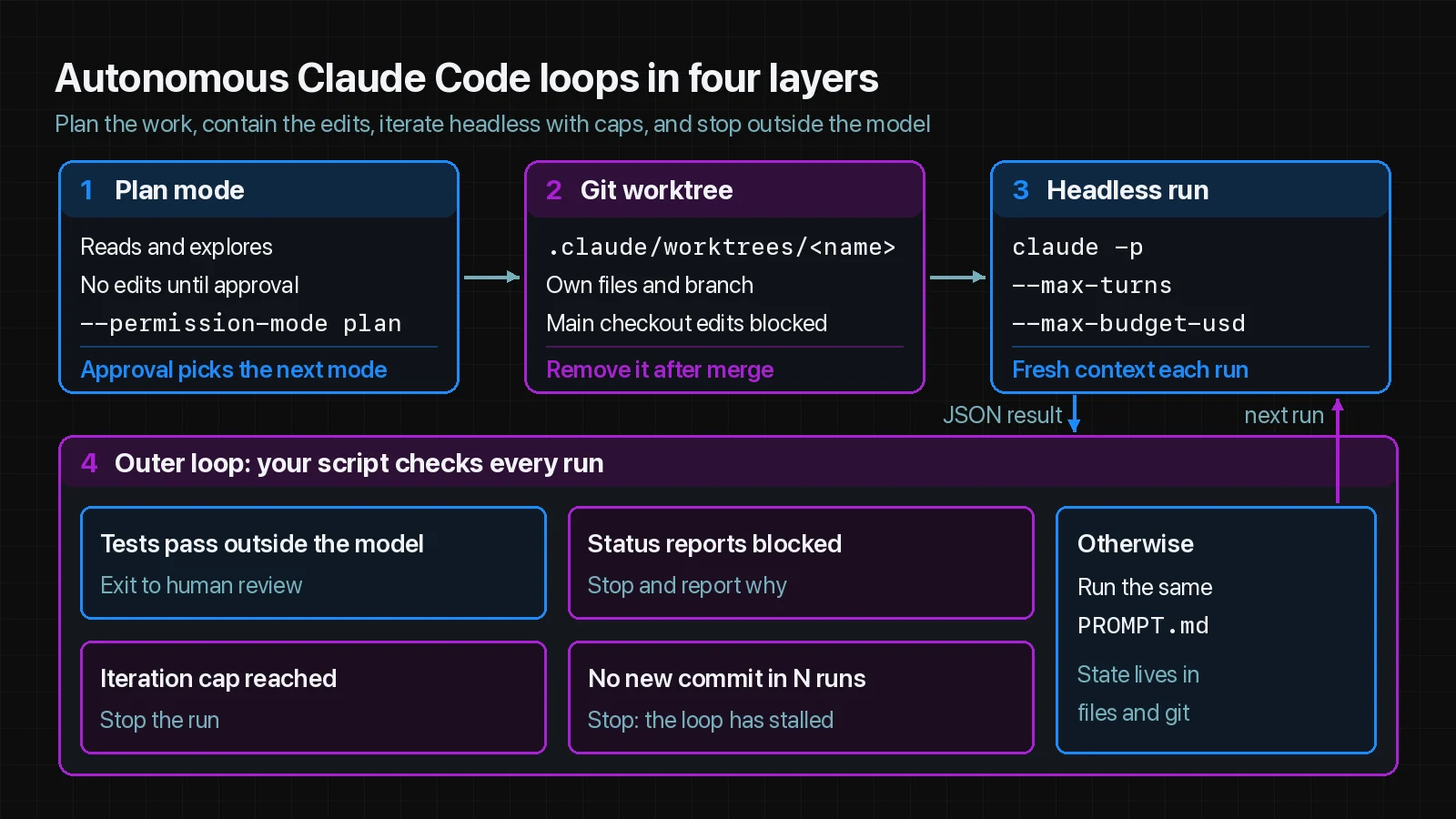
An autonomous coding loop is a run in which Claude Code keeps working without a person approving each step, and stops on a condition defined in advance. Claude Code supplies the primitives: plan mode for a human checkpoint before work starts, git worktrees for file isolation, headless claude -p runs for unattended iterations, and hooks for deterministic checks. The Ralph Wiggum loop, a pattern Geoffrey Huntley described in July 2025, is the simplest way to drive them: run the same prompt again and again, with state carried in files and git.
This guide covers the operational architecture of those loops: what each primitive permits, where each one fails, how to stop a loop that will not stop on its own, and how to keep the damage small when something goes wrong. It does not re-cover goal design. For writing a completion condition and the /goal evaluator, read A /goal Is a Condition, Not a Sitting and Writing Deterministic Goal Contracts. For choosing between subagents, agent teams and the Agent SDK, read Choosing a Topology.
Every flag and behaviour below was checked against the linked Claude Code documentation and source repositories on November 24, 2026. Claude Code changes quickly and several behaviours are version-gated, so pin the version your loops run on and re-check the docs when you upgrade.
Which execution pattern fits an autonomous Claude Code task?
Five patterns cover the common ways teams run Claude Code, from fully supervised to fully unattended. They differ less in raw capability than in where isolation comes from, where a person still looks at the work, and what ends the run. The table summarizes each; the sections that follow give the documented detail behind every cell.
| Pattern | Isolation | Human checkpoint | Exit condition | Typical failure mode |
|---|---|---|---|---|
| Interactive session | Your own checkout. Auto mode is the built-in starting mode from v2.1.283, so a classifier reviews most actions; the Bash sandbox is off by default | Every prompt you type, plus any permission prompt | You stop | Approvals become reflexive, or a long session drifts from the original task |
| Plan mode | Reads and exploratory commands; edits stay blocked until you approve, except in interactive terminal sessions with bypass permissions available | The plan approval prompt, which also chooses the next permission mode | You approve the plan, or choose to keep planning | A plan approved unread, or approved by pressing Shift+Tab at the prompt |
| Git worktree parallelism | A separate checkout and branch under .claude/worktrees/; edits and git commands aimed at the main checkout are blocked | An exit prompt when the worktree holds work, then review when you merge | The session ends and the worktree is kept or removed | Orphaned worktrees from -p runs; cp or shell redirects into the main checkout are not refused |
| Headless loop | Only what you pass: --worktree, a permission mode, allow and deny rules, a sandbox or a container | None inside the run; a person reviews the branch afterwards | A check your script runs, plus iteration, --max-turns and --max-budget-usd caps | The model reports success early, or iterations repeat without progress |
| Hook-gated CI | The CI runner plus an exact allowlist, such as dontAsk with --allowedTools | Pull request review before merge | A Stop hook that blocks until checks pass, capped at eight consecutive continuations, plus --max-turns in claude_args | A Stop hook that exits 2 with a missing-file error on stderr is treated as non-blocking, so the gate opens |
Two sources anchor the last row. The GitHub Actions docs say claude_args accepts any Claude Code CLI argument and recommend --max-turns there to limit iterations. The hooks reference documents the continuation cap and the missing-file exception, which means a gate script that is not where the hook expects it fails open, not closed. Setting "onFailure": "block", from v2.1.295, makes a failed PreToolUse guard hook block the tool call, but the docs state the field has no effect on Stop hooks, so a Stop-hook gate that cannot run simply lets the turn end. Re-check completion in the CI job itself, and test the failure path of every gate, not just the pass path.
What does Claude Code plan mode permit, and how do you approve a plan?
Plan mode tells Claude to research and propose changes without making them. Claude reads files, runs shell commands to explore and writes a plan, but does not edit your source. Shell commands during planning follow the first rule that matches: in interactive terminal sessions with bypass permissions available they run with neither the classifier nor a prompt; when auto mode is available and the useAutoModeDuringPlan setting is on, which is the default, the auto mode classifier reviews them instead of prompting you; otherwise anything outside the built-in read-only command set asks for approval.
There are three ways in. Press Shift+Tab until the status bar reads plan mode on, prefix a single prompt with /plan, or start with claude --permission-mode plan as the common workflows page shows. To make plan mode the default for a project's terminal sessions, set defaultMode to plan in .claude/settings.json. The VS Code extension ignores project settings for this and reads claudeCode.initialPermissionMode from user settings instead.
When the plan is ready, Claude asks how to proceed. Yes, and use auto mode approves and switches to auto mode; when auto mode is unavailable the same option reads Yes, auto-accept edits. Yes, manually approve edits approves and returns you to per-edit review. No, keep planning keeps the session in plan mode so you can redirect it. Ctrl+G opens the proposed plan in your editor so you can change it before Claude proceeds. One trap is documented: at the approval prompt, Shift+Tab approves the plan, so press Esc first if you only meant to leave plan mode.
Plan mode as a governance checkpoint
Architecturally, the approval prompt is where a supervised phase hands off to an unsupervised one. Approving a plan exits plan mode and switches the session to the permission mode the chosen option describes, so one decision settles both what will be built and how much autonomy the build gets. Three documented details matter for policy:
- Plan mode is not an edit barrier when bypass permissions is available. The permission modes page says not to rely on plan mode's blocks in interactive terminal sessions with bypass permissions available, because an edit or shell command attempted during planning can run without a prompt.
- Hooks cannot approve their way out of planning. In plan mode, a
PreToolUsehook'sallowhas no effect on a file edit or any other call that is not read-only, apart fromExitPlanModeitself, according to the permissions docs. - Subagents inherit it, except agent team teammates. When the main conversation is in plan mode, a subagent stays in plan mode whatever
permissionModeits definition sets, per the subagent docs.
For pipelines, the docs confirm that the same --permission-mode flag works with -p. A headless planning pass, run with --permission-prompts none so anything that would wait on a person is denied, gives you a draft plan to store, review or gate before a separate write-enabled run starts. The docs describe the approval flow only for interactive sessions, so verify on your pinned version how a headless planning run ends before you build a gate on it. The separation itself, one read-mostly run and one write run, is the cheapest human checkpoint you can add to an otherwise unattended loop.
How do Claude Code worktrees isolate parallel sessions and subagents?
A git worktree is a separate working directory with its own files and branch that shares the repository's history and remote. Per the worktrees docs, claude --worktree feature-auth (or -w) creates one under .claude/worktrees/feature-auth/ on a new branch named worktree-feature-auth and starts the session in it; omit the name and Claude Code generates one. The repository needs at least one commit. Interactive runs require workspace trust, but -p runs skip the trust check, so claude -p --worktree proceeds without it. Inside a session you can also ask Claude to work in a worktree, and it moves there with the EnterWorktree tool.
New worktrees branch from the default branch on the remote unless worktree.baseRef is set to head, which carries your unpushed local work. Passing --worktree "#1234" or a pull request URL fetches that change from origin and branches from it. Because a worktree is a fresh checkout, gitignored files such as .env are absent; a .worktreeinclude file in .gitignore syntax copies matching ignored files into each new worktree. Add .claude/worktrees/ to .gitignore so worktree contents do not show up as untracked files in the main checkout.
What the isolation checks enforce, and what they miss
A session started with --worktree, but not --tmux, is isolated, and Claude Code applies four checks to it and to every subagent it spawns:
- File edits:
Edit,WriteandNotebookEditcalls that target a path in the main checkout are blocked. - Command working directory: Bash, PowerShell and Monitor commands whose working directory resolves to the main checkout, or cannot be verified to stay outside it, are blocked.
- Git redirects: commands that point git at the main checkout through
git -C,--git-dir,GIT_DIR,GIT_WORK_TREEor acdare blocked. - Command shape: commands whose git use cannot be verified from the text, for example a command name computed at runtime, are blocked. This check cannot be turned off.
The documented gap is just as specific. None of the checks tracks which files a shell command writes, so cp or a shell redirect into the main checkout is not refused by them; that falls to your permission rules and the Bash sandbox, which is off by default. Worktrees isolate file edits and nothing more. Network access, environment variables and credentials are governed by your permission rules and sandbox settings, whichever checkout the session runs in.
The docs also list what every worktree shares with the main checkout, and each item is a governance consideration:
- The repository's
.gitdirectory, so commits from every worktree land in one shared object store. - Plugins installed at project scope from the main checkout.
- Permission approvals. Choosing Yes, and don't ask again for a Bash command in a worktree saves the rule to the main checkout's
.claude/settings.local.json, where it applies to every worktree of the repository and survives the worktree's removal. On Windows the rule stays with that worktree. - Untracked skills, agents and commands, which are read through from the main checkout when the worktree has no
.claude/skillsdirectory of its own.
Hooks need one adjustment. After Claude enters a worktree, ${CLAUDE_PROJECT_DIR} keeps pointing at the main checkout while the cwd field in the hook's input JSON follows Claude. A guard hook that resolves paths from ${CLAUDE_PROJECT_DIR} checks the wrong tree.
Worktree subagents and cleanup
Adding isolation: worktree to a custom subagent's frontmatter gives each invocation a temporary worktree, removed automatically when the subagent finishes without changes. Such a subagent takes its instruction files from the main conversation, not from the worktree's branch. Cleanup then depends on how the worktree was made:
- Interactive
--worktreesessions: on exit, a clean worktree from an unnamed session is removed with its branch, and a worktree that holds work prompts you to keep or remove it. - Headless
-pruns: there is no exit prompt, so Claude Code does not clean up their worktrees and leaves the lock it took in place. Remove them withgit worktree remove, runninggit worktree unlockfirst if git refuses. - Subagent and backgrounded-session worktrees: a periodic sweep removes them once they are older than
cleanupPeriodDays, 30 days by default, but keeps any that still hold changed or untracked files or unpushed commits. It also keeps the worktree of a--worktreesession you have not backgrounded, whatever its age.
The operational rule that follows: a fleet of headless loops accumulates worktrees and branches until someone removes them, so removal belongs in each loop's own teardown, after its branch is merged or archived.
How do headless claude -p runs behave inside a loop?
claude -p, or --print, runs Claude Code non-interactively and exits. The headless docs state that it exits 0 on success and non-zero when the run fails, that an invalid flag is reported on stderr before the run starts, and that a failure inside the run, such as missing authentication, is printed as the result on stdout. --output-format takes text, the default, json, which carries the result, session ID and metadata, or stream-json, newline-delimited events used with --verbose. The JSON payload includes total_cost_usd and a per-model cost breakdown, which the docs call client-side estimates that can differ from your bill.
Three more flags matter in a loop. --json-schema returns schema-conforming data in a structured_output field, and the docs warn that a run ending without valid structured output, for example because Claude declined, has no such field, so check for it. The CLI reference adds --max-turns, which limits agentic turns, and --max-budget-usd, which stops the run once estimated spend reaches a cap. Both are print-mode only, and the Agent SDK loop docs list no default limit for either.
Permissions in an unattended run
From v2.1.302, a -p run with no permission mode set starts in Manual mode, and calls that need approval are denied unless an allow rule, a hook or a permission prompt tool approves them. That makes the allowlist the real design surface:
--allowedToolspre-approves tools or commands in permission rule syntax, for exampleBash(git commit *). The space before the asterisk matters: without it,Bash(git diff*)would also matchgit diff-index.--permission-mode dontAskdenies anything that would prompt and is described as useful for locked-down CI;acceptEditsauto-approves file edits and common filesystem commands only inside the working directory oradditionalDirectories;autohands each decision to the classifier.--permission-prompts none, from v2.1.259, denies whatever nothing else resolves instead of waiting on a permission host, and removes tools that need a person, such asAskUserQuestion.--disallowedToolsadds deny rules, and deny rules block in every mode, includingbypassPermissions.
Bare mode versus hook-gated containment
--bare skips auto-discovery of hooks, skills, custom commands, subagents, plugins, MCP servers, auto memory and CLAUDE.md. It never reads OAuth credentials, so it needs ANTHROPIC_API_KEY or an apiKeyHelper passed in --settings, and the docs call it the recommended mode for scripted calls that will become the default for -p in a future release. Hooks do not run in bare mode, even when passed through --settings. That is a real trade-off: bare mode removes untrusted repository configuration from the run, but it also removes any hook you were relying on as a circuit breaker. If containment depends on hooks, do not use bare mode; enforce limits with permission rules, which bare mode still reads, or move the check into the outer script.
The opposite risk applies without bare mode. A -p session never shows the workspace trust dialog, so in a folder you have never trusted it runs hooks from the project's settings files and connects servers from its .mcp.json without asking, while ignoring permissions.allow rules in the project's .claude/settings.json. For a repository you did not write, the permissions docs list the options: --setting-sources user, --bare, or --settings '{"disableAllHooks": true}' for that run.
Fresh context or continued context
--continue resumes the most recent conversation and --resume with a session ID resumes a specific one, carrying context across runs. A new claude -p call with neither starts from a fresh context. That choice is the main architectural difference between the two Ralph implementations described next.
Stopping a run has documented semantics too. SIGTERM ends a run with exit code 143, leaves the in-progress turn unfinished and runs SessionEnd hooks. A run that started background work can wait for it, stopping it after 10 minutes of idle waiting by default, and reaching the --max-budget-usd cap stops remaining background work instead of waiting.
What is the Ralph Wiggum loop, and what do its primary sources say?
Geoffrey Huntley introduced the technique in Ralph Wiggum as a software engineer, dated July 14, 2025. His definition is short: "Ralph is a technique. In its purest form, Ralph is a Bash loop," illustrated with while :; do cat PROMPT.md | claude-code ; done. The command name in that one-liner is his; the installed Claude Code binary is claude. He adds that Ralph "can be done with any tool that does not cap tool calls and usage."
The operating rules in the post are more useful than the one-liner:
- One item per loop. Huntley repeats the rule and says to narrow back to a single item whenever the work starts going off the rails.
- Allocate the same context every loop: the plan file,
fix_plan.mdin his example, and the specifications, so each fresh context window starts from the same state. - Use the primary context as a scheduler and push expensive work to subagents, but use only one subagent for build and test, because fanning validation out to hundreds of subagents produces what he calls bad form back pressure.
- Wire in back pressure that rejects bad output: tests, type systems, static analysers and security scanners. For dynamically typed languages he stresses adding a static analyser or type checker.
- Expect to wake up to a broken codebase from time to time, and make a judgement call between
git reset --hardand a rescue prompt. - Scope it to greenfield work. He writes "There's no way in heck would I use Ralph in an existing code base", expects to get about 90 percent done, and states that there is no way this is possible without senior expertise guiding Ralph.
The official ralph-loop plugin
Anthropic added a ralph-wiggum plugin to the anthropics/claude-code repository on November 16, 2025, and on January 6, 2026 renamed it ralph-loop in the anthropics/claude-plugins-official repository, where Anthropic's plugins are now developed. The anthropics/claude-code plugins directory now holds only a README stating that its marketplace still lists those plugins and installs them from claude-plugins-official. The plugin's README quotes Huntley's definition, then implements the loop differently: inside one session, through a Stop hook. Its source shows the mechanism:
/ralph-loop "<prompt>" --max-iterations <n> --completion-promise "<text>"writes a state file,.claude/ralph-loop.local.md, holding the iteration count, the cap (0, meaning unlimited, by default), the completion phrase, the session ID and the prompt.- When Claude tries to end its turn, the Stop hook script returns
decision: "block"with the original prompt as thereason, so the same prompt is fed back. - The loop ends when the iteration cap is reached, or when Claude's last text contains the completion phrase inside
<promise>tags as an exact string match./cancel-ralphdeletes the state file. - The hook ignores every session except the one that started the loop, because the state file is project-scoped while the Stop hook fires in every session in that project.
The README is candid about limits. Exact matching means one promise cannot express several outcomes such as SUCCESS versus BLOCKED, so it tells you to rely on --max-iterations as the primary safety mechanism, and it lists tasks that need human judgement, tasks with unclear success criteria and production debugging as poor fits.
Bash loop versus Stop-hook loop
The two implementations make different context trade-offs. In Huntley's Bash loop every iteration is a new process, "with each loop with its new context window" in his words, and continuity lives only in files and git. In the plugin, the loop happens inside the current session, so earlier iterations stay in context until compaction summarizes them. Huntley's page now links a video under the line "why the claude code plugin isn't it". We have not reviewed that video, so the comparison here rests only on the two written sources.
| Dimension | Bash loop around claude -p | ralph-loop plugin | /goal |
|---|---|---|---|
| Where the loop lives | Your script | A Stop hook in the session | A built-in, session-scoped, prompt-based Stop hook |
| Context per iteration | Fresh; state lives in files and git | Accumulates in one session until compaction | Accumulates in one session |
| Who decides it is done | Your script's checks | An exact <promise> string match, or the iteration cap | A separate model evaluating your condition |
| Built-in stop | None; you add iteration, turn and budget caps | --max-iterations, unlimited by default | Condition met, judged impossible, or an error you have to fix |
| Best fit | Unattended greenfield or batch work | Supervised iteration you can watch | See the goal articles linked above |
One documented interaction matters for both in-session approaches. Claude Code caps Stop hooks at eight consecutive continuations, after which it overrides the next block and ends the turn, and the count resets every time Claude calls a tool. A productive Ralph iteration calls tools, so the cap rarely ends a working loop; it catches only the degenerate case where Claude keeps ending turns without doing anything. CLAUDE_CODE_STOP_HOOK_BLOCK_CAP raises the cap, and the environment variable reference says 0 disables it, which removes the last built-in backstop. A loop that is busy but unproductive passes straight through this cap, which is why the exit criteria below live outside the model.
What exit criteria and circuit breakers should end an autonomous loop?
A loop needs two kinds of stop. A success exit proves the work is done; a circuit breaker ends the run when a measured signal says it will not get there, whatever the model believes. Our recommendation is to keep both outside the model, in the script that launches each iteration:
- Verified success. The model may report done, but the script re-runs the tests or build itself before exiting.
- An explicit blocked state. A structured status lets the model stop honestly instead of reaching for a completion phrase, the failure the plugin's own command text warns against when it tells Claude not to output false promises to escape the loop.
- An iteration cap. A hard count in the script, because neither
--max-turnsnor the plugin's--max-iterationshas a limit by default. - Per-iteration turn and spend caps:
--max-turnsand--max-budget-usdon everyclaude -pcall. - Stall detection. No new commit after a set number of iterations ends the run; Huntley's one item per loop rule makes a commit per iteration a reasonable progress signal.
- Aggregate spend. A Console workspace spend limit, or organization, group or member spend limits on Team and Enterprise plans, sits above every per-run cap, as the costs page describes.
The reference pattern below implements those breakers with documented flags only. It assumes a repository whose tests run with npm test and a PROMPT.md at the repository root; replace both with your own.
#!/usr/bin/env bash
# Illustrative outer loop: one fresh headless context per iteration,
# with every stop condition enforced outside the model.
# Run from the repository root. Every claude flag is in the CLI reference.
set -euo pipefail

RUN="loop-$(date +%Y%m%d-%H%M)"   # one worktree for the whole run
WT=".claude/worktrees/$RUN"       # where --worktree places it
MAX_ITER=20                       # hard iteration cap
STALL_LIMIT=3                     # iterations allowed without a new commit
SCHEMA='{"type":"object","properties":{"status":{"type":"string","enum":["done","continue","blocked"]},"note":{"type":"string"}},"required":["status","note"]}'

stall=0; last=""
for i in $(seq 1 "$MAX_ITER"); do
  if ! out=$(claude -p "$(cat PROMPT.md)" \
      --worktree "$RUN" \
      --permission-mode acceptEdits \
      --permission-prompts none \
      --allowedTools "Bash(npm test *),Bash(git add *),Bash(git commit *)" \
      --disallowedTools "Bash(git push *)" \
      --max-turns 40 \
      --max-budget-usd 4.00 \
      --output-format json \
      --json-schema "$SCHEMA"); then
    echo "iteration $i: claude exited non-zero, stopping"; exit 1
  fi

  status=$(jq -r '.structured_output.status // "none"' <<<"$out")
  echo "$i $(jq -r '.session_id' <<<"$out") $status $(jq -r '.total_cost_usd' <<<"$out")" >> loop-ledger.txt

  # Never trust "done" on its own: re-run the check outside the model.
  if [ "$status" = "done" ] && (cd "$WT" && npm test); then exit 0; fi
  if [ "$status" = "blocked" ]; then
    echo "blocked: $(jq -r '.structured_output.note' <<<"$out")"; exit 2
  fi

  head=$(git -C "$WT" rev-parse HEAD)
  if [ "$head" = "$last" ]; then stall=$((stall + 1)); else stall=0; last=$head; fi
  if [ "$stall" -ge "$STALL_LIMIT" ]; then
    echo "no new commit in $STALL_LIMIT iterations, stopping"; exit 3
  fi
done
echo "reached MAX_ITER without a verified finish"; exit 4
Design notes, each tied to the docs. --worktree with an existing name reopens that worktree rather than creating a new one, and with the default fresh base a reopened worktree that has no commits of its own and no changes resets to the default branch, one more reason each iteration should commit. --permission-mode acceptEdits limits automatic edit approval to the working directory and any additionalDirectories, and --permission-prompts none turns every remaining prompt into a denial. The ledger records each iteration's session ID so transcripts stay findable for review; avoid --no-session-persistence in loops you may need to audit, because it stops sessions from being saved or resumed.
Worked example: the spend ceiling of a capped loop
Illustrative arithmetic, not a measurement. Assume the script above: at most 20 iterations, each capped at an estimated $4.00. The nominal ceiling is 20 x $4.00 = $80.00. The real ceiling is higher, because the Agent SDK loop docs explain that Claude Code checks the cap after each model response arrives: the response that crosses the cap still completes, and subagents running at that moment keep spending until they stop. Each iteration can therefore overshoot by one response plus in-flight subagent spend. The stall breaker may end a failing loop well before the iteration cap, but budget for the cap, not the hope.
For scale, the costs page puts the enterprise average at around $13 per developer per active day, with 90 percent of users below $30. A single unattended loop under these caps can exceed that average day's spend in one run, which is why the aggregate workspace limit matters. Model choice and prompt caching move the per-iteration figure; the Claude 5.5 routing and caching guide covers both.
How do you contain the blast radius of an unattended loop?
Blast radius is what a loop can damage before a breaker trips. Token risk and blast radius move independently: a runaway loop in a well-isolated worktree burns money but harms nothing else, while one short run with a broad allowlist in an untrusted repository can do real damage cheaply. The matrix pairs each risk with its documented control and the gap that control leaves.
| Risk | Token exposure | Blast radius | Primary containment | Residual gap |
|---|---|---|---|---|
| Unbounded iterations | High: grows with every iteration | The loop branch | A script iteration cap plus --max-turns and --max-budget-usd on each run | The budget cap is a client-side estimate and can be overshot by one response plus running subagents |
| Context growth in an in-session loop | High: earlier iterations stay in context | One session | A fresh claude -p process per iteration, with plan and specs re-read from files | Reasoning that is not written to files is lost between iterations |
| Subagent fan-out | Multiplied: the docs note that parallel sessions and subagents multiply token usage | The shared worktree, unless subagents use isolation: worktree | --max-budget-usd counts subagent spend, and spawning fails with Budget limit reached at the cap | Background subagents stopped at the cap leave partial work |
| Edits escaping the worktree | Low | The main checkout | The four --worktree isolation checks | cp and shell redirects are not refused; enable the Bash sandbox |
Untrusted repository configuration under -p | Unpredictable: set by whatever the repository hooks and MCP servers do | Your machine and credentials | --setting-sources user, --bare, or disableAllHooks passed through --settings | Under --bare the project env block and helpers such as awsAuthRefresh still apply |
| Irreversible remote actions | Low | Remote repositories and services | Deny rules such as Bash(git push *), which block in every mode | Bash rules match command text, so git -C . push is not stopped; add the sandbox network allowlist or a PreToolUse hook |
| Approval drift | None | Every worktree of the repository | Review the main checkout's .claude/settings.local.json after unattended runs | Yes, and don't ask again in one worktree applies to all of them |
| Secrets copied into worktrees | None | Each new worktree | Keep .worktreeinclude patterns to the files the loop actually needs | Every gitignored file a pattern matches is copied into every worktree Claude Code creates with git |
| A guard hook that crashes or goes missing | None | Whatever the hook was guarding | Set onFailure to block on PreToolUse guard hooks so a failure blocks the call | The field has no effect on Stop hooks, so a failed Stop-hook gate lets the turn end |
| bypassPermissions | Not changed by the mode | Everything the process can reach | A container or VM, run as a non-root user | Allow rules have no effect; only deny rules and the outer boundary remain |
Two rules of thumb follow. First, put hard limits where the model cannot negotiate with them: deny rules, the sandbox, the container boundary and the outer script. Second, use --dangerously-skip-permissions only when a container or VM is itself the boundary, which is the setup the permission modes page pairs with that flag.
For fail-closed PreToolUse breaker designs and a fuller threat model, read Agentic Risk Architecture. For a three-lane governance model that places tripwires between prompt rules and OS sandboxes, read Three-Lane Agent Governance.
Which loop architecture should an engineering lead standardize?
Our recommendation, as a default to adapt rather than a rule:
- Require a plan-mode pass before any loop that writes to a shared repository. For an interactive pass, record which approve option was chosen; a headless pass yields a draft plan with no approval step, so a person reviews that plan before the loop starts.
- Give every autonomous run its own worktree and branch, and make worktree removal part of the loop's teardown.
- Prefer fresh-context
claude -piterations for unattended greenfield and batch work, and the in-session ralph-loop plugin only when someone is watching. - Keep success checks, iteration caps and stall detection in the outer script, and treat
--max-turns,--max-budget-usdand the Stop hook cap as per-run backstops. - Decide deliberately between
--bareand hook-gated runs, and never run-pwith project settings loaded in a repository you have not reviewed. - Log each iteration's session ID and estimated cost, set a workspace spend limit above the loops, and write the configuration into an architecture decision record. The MCP vs CLI decision record includes a reusable template.
Huntley's own caution is the right ceiling on ambition: he described the technique for bootstrapping greenfield projects with senior engineers steering it. Test a loop on one bounded task, document the iterations, cost and failure points, then widen its scope. For how the same isolation primitives compare in Codex and Cursor, see Claude Code vs Codex vs Cursor.
Primary sources checked November 24, 2026
- Claude Code: Common workflows (plan mode, worktrees, scripts)
- Claude Code: Choose a permission mode (plan mode approval flow)
- Claude Code: Run parallel sessions with worktrees
- Claude Code: Run Claude Code programmatically (headless)
- Claude Code: CLI reference
- Claude Code: Hooks reference (Stop hook and continuation cap)
- Claude Code: Subagents (isolation, maxTurns, permissionMode)
- Claude Code: Configure permissions (rules, trust, plan mode hooks)
- Claude Code: Configure the sandboxed Bash tool
- Claude Code: Settings reference
- Claude Code: Environment variables
- Claude Agent SDK: How the agent loop works (turns, budget headroom)
- Claude Code: Manage costs effectively
- Claude Code: Run agents in parallel
- Claude Code: Keep Claude working toward a goal (/goal)
- Claude Code: Run prompts on a schedule (/loop)
- Claude Code: GitHub Actions
- Geoffrey Huntley: Ralph Wiggum as a "software engineer" (July 14, 2025)
- anthropics/claude-plugins-official: ralph-loop plugin
- anthropics/claude-plugins-official: ralph-loop Stop hook script
- anthropics/claude-code: commit adding the ralph-wiggum plugin
- anthropics/claude-plugins-official: commit renaming it to ralph-loop
- anthropics/claude-code: plugins directory README
Frequently Asked Questions
What does plan mode do in Claude Code?
Plan mode makes Claude research and propose changes without editing your source. It reads files, runs exploratory shell commands and writes a plan, then asks you to approve it. Enter it with Shift+Tab, a /plan prompt prefix or claude --permission-mode plan. Approving switches the session to the permission mode you pick, such as auto mode or manual edit review.
What is the Ralph Wiggum loop in Claude Code?
It is Geoffrey Huntley's technique of running a coding agent in a Bash loop that feeds it the same prompt file every iteration, with progress carried in files and git. Anthropic's official ralph-loop plugin, first named ralph-wiggum, runs it inside one session instead, using a Stop hook, an iteration cap and an exact completion phrase.
How do I run Claude Code in a git worktree?
Run claude --worktree with a name, or -w, inside a git repository that has at least one commit. Claude Code creates the worktree under .claude/worktrees/ on a branch named worktree- plus that name. Interactive sessions offer cleanup on exit; headless -p runs leave the worktree and its lock, so remove those with git worktree remove.
How do I run Claude Code headless?
Pass -p with a prompt, for example claude -p "run the tests" --output-format json. The run exits 0 on success and non-zero on failure. From v2.1.302 it starts in Manual mode, so pre-approve tools with --allowedTools or choose a permission mode, and cap each run with --max-turns and --max-budget-usd.
How do I stop a Ralph loop that never finishes?
With the ralph-loop plugin, run /cancel-ralph, which deletes the .claude/ralph-loop.local.md state file, and always start with --max-iterations because the default is unlimited. With a Bash loop around claude -p, enforce an iteration cap in the script, set --max-turns and --max-budget-usd per run, and stop when iterations add no commits.
Is /loop the same as a Ralph loop?
No. /loop re-runs a prompt within an open session on a time interval, or at a pace Claude chooses, and is meant for jobs such as polling a deployment or babysitting a pull request. A Ralph loop re-runs the same task prompt as soon as the previous iteration ends, until a completion check or a cap stops it.